
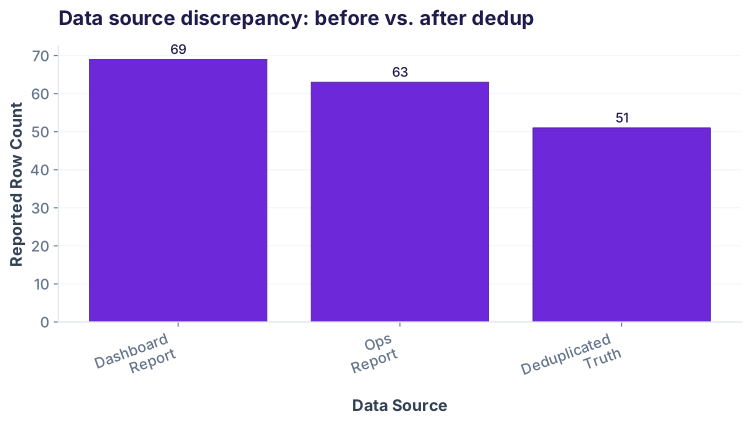
It's Monday morning. Aisha logs into the M-Pesa pipeline dashboard and sees "Weekend transactions: 8,432." But her operations team just reported 5,803 unique transactions for the same weekend. That's a 45% overcount.
She digs into the raw export: some transaction records have been ingested twice. Same `txn_id`, same customer, amount, and merchant — but captured at two different timestamps because the pipeline retried the ingestion. The database shows every copy. Her analysis will be wrong until she deduplicates.
The duplicates problem
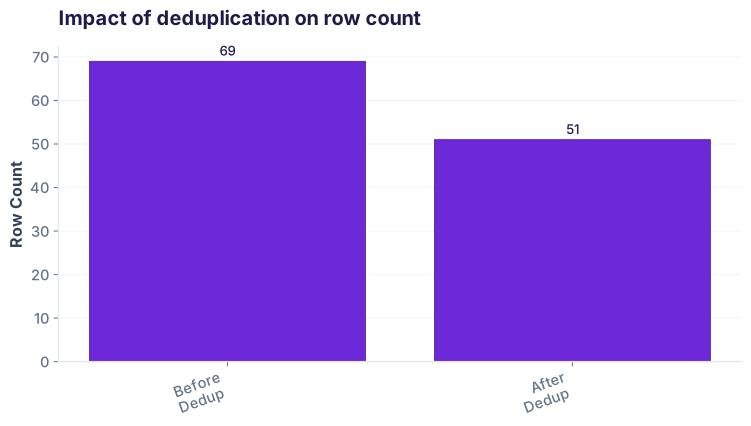
Sample duplicate rows
| # | txn_id | customer_id | merchant | amount_ksh | timestamp |
|---|---|---|---|---|---|
| 2 | TXN20260411002 | C-1002 | Carrefour | 2800 | 2026-04-11 19:45 |
| 3 | TXN20260411002 | C-1002 | Carrefour | 2800 | 2026-04-11 19:45 |
| 5 | TXN20260411005 | C-1005 | Chandarana Foodplus | 890 | 2026-04-11 22:10 |
| 6 | TXN20260411005 | C-1005 | Chandarana Foodplus | 890 | 2026-04-11 22:10 |
What counts as a duplicate?
Not all duplicates look the same. Here are the four kinds Aisha encountered:
| Type | Example | How to catch | Severity |
|---|---|---|---|
| Exact row duplicate | Same txn_id, customer, amount, timestamp | df.duplicated() |
✅ Easy |
| Duplicate by key | Same txn_id but different amounts (data error) | df.duplicated(['txn_id']) |
⚠️ Investigate |
| Near-duplicate (case/space) | "Java House", "java house", "JAVA HOUSE" | Normalize first, then dedup | ⚠️ Common |
| Semantic duplicate | Same txn_id, different ingest timestamps (pipeline retry) | drop_duplicates(['txn_id'], keep='first') |
🔴 High |
Finding duplicates — the 4 commands
Pandas gives you four ways to find duplicates. Let's walk through each with Aisha's weekend data.
1. Count total duplicates
Start by seeing how many rows are duplicated:
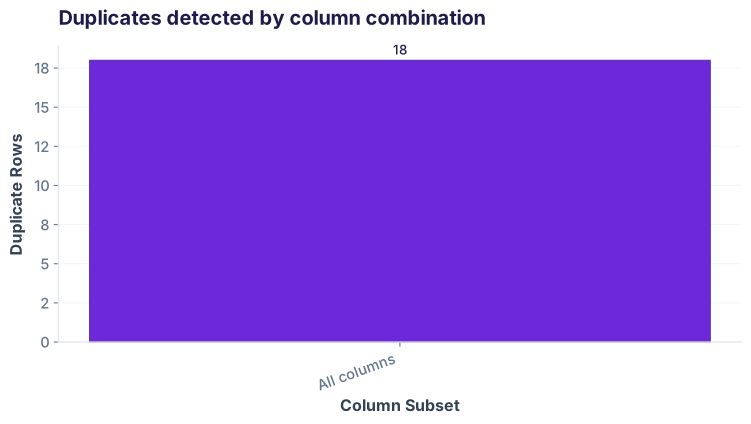
df.duplicated() returns a boolean Series marking each row as True (duplicate) or False (first occurrence). .sum() counts the True values.
2. See every duplicate row
To inspect what's duplicated, show all copies (original + duplicates):
keep=False marks all copies as duplicates (including the first). Without it, only the 2nd+ copies are marked. This is useful for inspection but not for removal.
3. Check by specific columns
Sometimes you only care about duplicates in certain columns (e.g., same transaction ID, regardless of merchant name typos):
txn_id but different amounts, that's a data quality bug. By checking subsets, you can spot these issues before they corrupt your analysis.
Aisha's real problem: same txn, 2 pipeline ingests
The weekend double-count wasn't caused by copy-paste errors in the database. It was caused by the data pipeline retrying ingestion. One transaction got stored twice with slightly different timestamps.
The problem: same txn_id, different ingest_timestamp
| txn_id | customer_id | merchant | amount_ksh | timestamp | ingest_timestamp |
|---|---|---|---|---|---|
| TXN20260411020 | C-1020 | Tuskys | 2200 | 2026-04-13 08:15 | 2026-04-13 08:15:00 |
| TXN20260411020 | C-1020 | Tuskys | 2200 | 2026-04-13 08:15 | 2026-04-13 08:18:00 |
The solution: drop_duplicates with keep='first'
Sort by ingest timestamp, then drop duplicates keeping only the first (earliest) ingest:
The result: weekend count now matches operations
Near-duplicates: normalize before deduping
Exact duplicates are easy to catch. But Aisha also found merchant names spelled differently: "Java House", "JAVA HOUSE", "Java House " (with trailing space), and "javahouse". These are the same merchant but stored as different strings.
The problem: merchants with inconsistent case and spacing
| customer_id | merchant | amount_ksh | date |
|---|---|---|---|
| C-1001 | Java House | 450 | 2026-04-11 |
| C-1007 | java house | 500 | 2026-04-12 |
| C-1031 | JAVA HOUSE | 490 | 2026-04-13 |
| C-1048 | JAVA HOUSE | 510 | 2026-04-14 |
The solution: normalize strings before dedup
Use .str.lower() and .str.strip() to normalize case and whitespace:
After normalization: 4 rows collapse to 1 unique value
| customer_id | merchant | amount_ksh | date |
|---|---|---|---|
| C-1001 | java house | 450 | 2026-04-11 |
| C-1007 | java house | 500 | 2026-04-12 |
| C-1031 | java house | 490 | 2026-04-13 |
| C-1048 | java house | 510 | 2026-04-14 |
Dedup within groups: latest per customer
Sometimes you don't want to remove all duplicates — you want to keep one row per group. For example, Aisha wants the latest transaction per customer this week:
Result: latest transaction per customer
| customer_id | merchant | amount_ksh | timestamp |
|---|---|---|---|
| C-1050 | Quickmart | 1200 | 2026-04-15 08:30 |
| C-1049 | Carrefour | 2770 | 2026-04-14 22:30 |
| C-1048 | JAVA HOUSE | 510 | 2026-04-14 21:10 |
| C-1047 | Tuskys | 2170 | 2026-04-14 20:15 |
| C-1046 | Chandarana Foodplus | 875 | 2026-04-14 19:30 |
drop_duplicates(subset=['customer_id'], keep='first') combined with a sort on timestamp descending gives you the latest per group. Use keep='last' if you want the earliest instead.
pd.read_csv('mpesa_weekend.csv') works.Cheatsheet: 10 duplicate commands
| Task | Command | Notes |
|---|---|---|
| Count duplicates | df.duplicated().sum() |
Returns count of duplicate rows (not including first) |
| See all duplicates | df[df.duplicated(keep=False)] |
Shows all copies, including the first |
| Duplicates in one column | df.duplicated(['txn_id']) |
Find rows with duplicate txn_id, ignore other columns |
| Duplicates in multiple columns | df.duplicated(['txn_id', 'amount']) |
Find rows with same txn_id AND amount |
| Remove exact duplicates | df.drop_duplicates() |
Keep first occurrence of each row |
| Remove by column, keep last | df.drop_duplicates(['txn_id'], keep='last') |
For each txn_id, keep the last row only |
| Remove by column, keep first | df.drop_duplicates(['txn_id'], keep='first') |
For each txn_id, keep the first row only |
| Normalize strings before dedup | df['col'] = df['col'].str.strip().str.lower() |
Remove whitespace and make lowercase |
| Get duplicate report | df.value_counts() |
Count occurrences of each row combination |
| Drop duplicates in-place | df.drop_duplicates(inplace=True) |
Modifies df directly; returns None |
Common pitfalls
df.sort_values('timestamp') first. Otherwise "last" means last in file order, not last chronologically.
df.drop_duplicates() keeps the first, which is correct. But if you use keep=False (meant for inspection), you'll delete all copies including the valid one.
.str.lower() before grouping or deduping by merchant/customer name.
df.drop_duplicates(['txn_id']) removes the entire row if txn_id is duplicated. If you only want to check one column, use subset=.
Mini challenge
Load the mpesa_weekend.csv file and complete the following:
- Find the total number of exact duplicate rows.
- Show all duplicate rows where txn_id is duplicated (use
keep=False). - Normalize the merchant column (lowercase + strip) and find how many near-duplicates collapse into unique merchants.
- Remove duplicates by txn_id keeping the first ingest, then report the final row count.
- Calculate the final weekend transaction count and compare to Aisha's ops report (5,803).
Interview questions
df.duplicated() and df.duplicated(keep=False)?
+
df.duplicated() marks every row except the first occurrence as True (default keep='first'). df.duplicated(keep=False) marks all copies (including the first) as True. Use the default for counting/removing; use keep=False for inspection when you want to see all related rows.
df.drop_duplicates() removes all rows that are exact duplicates of a previous row, keeping the first occurrence by default. For example: df_clean = df.drop_duplicates(). This works on all columns; you can also specify a subset.
df['merchant'] = df['merchant'].str.strip().str.lower() to remove leading/trailing whitespace and convert to lowercase. Then apply df.drop_duplicates(subset=['merchant']) to find unique merchants after normalization. The string methods .str.strip() and .str.lower() chain together to clean the entire column.
keep='first' and keep='last' in drop_duplicates()?
+
keep='first' keeps the first occurrence and removes later duplicates. keep='last' keeps the last occurrence and removes earlier ones. Combined with a sort, keep='last' lets you keep the most recent row: df.sort_values('date').drop_duplicates(['id'], keep='last') gives you the latest date for each ID.
ingest_timestamp ascending (earliest first), then use df.drop_duplicates(subset=['txn_id'], keep='first'). This keeps the first (earliest) ingest. The sort order is crucial because drop_duplicates() keeps by position in the DataFrame, not by value. Without sorting, you'd randomly keep whichever row happens to come first in the file, losing the semantic "earliest ingest" logic. Always sort before deduping when the "which copy to keep" decision depends on a column value (timestamp, date, version).
Used in: 3 domains
Detecting pipeline double-ingests (like Aisha's M-Pesa case) and reconciling transaction counts across systems.
Removing duplicate order records, customer signup duplicates, and merging near-duplicate product listings.
Deduplicating call detail records (CDRs) when network equipment logs the same call twice, or billing records with retry ingests.
Quiz: test your understanding
df.drop_duplicates(subset=['txn_id']), you have 8,500 rows. How many rows had duplicate txn_id values (including the first)?Ready to go further?
Join the Best AI Program: The AI-Era Analyst — 5 months, fully online, with placement assistance. Week 1 is free.
Explore The AI-Era Analyst →