
You're auditing vendor payments for a fintech in Bangalore. Three tables sit in your database: vendor master (name, GST, city), purchase orders (PO dates and amounts), and chart of accounts (GL codes). The question: which vendors in your POs exist in the master, which ones don't (dangling orders), and what GL account should each order map to?
Why joins? No serious analysis lives in one table.
Real data lives in multiple tables. A purchase order table doesn't know vendor names (just vendor IDs). A customer table doesn't know transaction amounts. A product table doesn't know orders per SKU. Joins glue them together.
The four join types: Venn diagrams
Every join has a left table, a right table, and a join key (the column you match on). The difference: which rows survive.
1. INNER JOIN
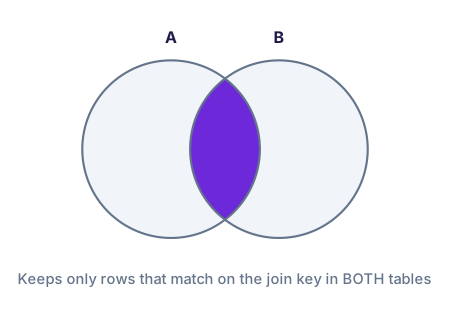
Only rows where the join key matches in BOTH tables
2. LEFT JOIN
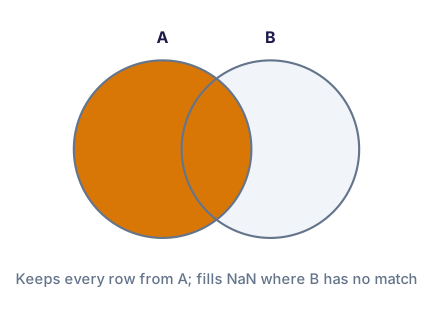
All rows from LEFT table + matches from RIGHT (NaN if no match)
3. RIGHT JOIN
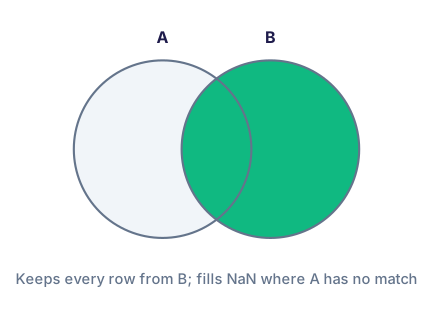
All rows from RIGHT table + matches from LEFT (NaN if no match)
4. OUTER JOIN
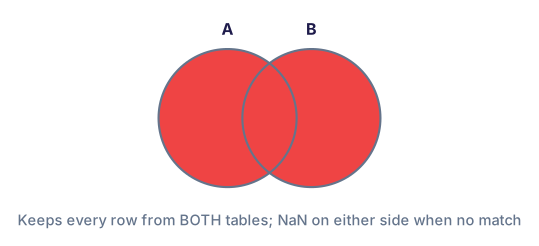
All rows from BOTH tables (NaN where no match on either side)
Inner join (default): Only matching records
This is the most common join in SQL. Only rows where the join key exists in both tables survive. Useful when you need a clean, complete dataset with no gaps.
| po_id | vendor_id | amount_inr | vendor_name | city | category |
|---|---|---|---|---|---|
| PO20260301 | V001 | 45,000 | Rajalaxmi Enterprises | Kochi | Office Supplies |
| PO20260302 | V002 | 120,000 | Global Tech Distributors | Mumbai | IT Hardware |
| PO20260303 | V003 | 32,000 | Kerala Paper Mills | Kochin | Office Supplies |
| PO20260304 | V004 | 67,500 | Delhi Supply Co. | Delhi | Office Supplies |
| ~5 POs with vendor_id V041–V045 dropped (no match in vendor master) | |||||
Left join (most common in practice): Keep all left rows
Left join preserves every row from the left table. If a vendor_id doesn't exist in the master, you get NaN for the vendor columns—but the PO row remains. This is essential for reconciliation and audit work.
| po_id | vendor_id | amount_inr | vendor_name | city |
|---|---|---|---|---|
| PO20260301 | V001 | 45,000 | Rajalaxmi Enterprises | Kochi |
| PO20260302 | V002 | 120,000 | Global Tech Distributors | Mumbai |
| PO20260393 | V041 | 98,000 | NaN | NaN |
| PO20260394 | V042 | 147,000 | NaN | NaN |
| PO20260395 | V043 | 72,000 | NaN | NaN |
Multi-table merge (chain): Vendor → GL codes
Real audits involve 3+ tables. Start with purchase orders, join to vendors, then join to the chart of accounts to attach GL codes. Chain merges with `.merge().merge()`.
| po_id | vendor_name | amount_inr | category | gl_account_code | gl_account_name |
|---|---|---|---|---|---|
| PO20260301 | Rajalaxmi Enterprises | 45,000 | Office Supplies | 6001 | Stationery & Office Supplies |
| PO20260302 | Global Tech Distributors | 120,000 | IT Hardware | 6002 | Computer & IT Equipment |
| PO20260303 | Kerala Paper Mills | 32,000 | Office Supplies | 6001 | Stationery & Office Supplies |
| PO20260317 | Hyderabad Services | 96,000 | Professional Services | 6003 | Professional Fees & Consulting |
Using indicator=True: Audit columns
The `indicator` parameter adds a new column showing which table each row came from. Values: both (match in both), left_only (in left table but not right), right_only (in right table but not left). Perfect for finding mismatches.
| po_id | vendor_id | vendor_name | _merge |
|---|---|---|---|
| PO20260301 | V001 | Rajalaxmi Enterprises | both |
| PO20260302 | V002 | Global Tech Distributors | both |
| PO20260393 | V041 | NaN | left_only |
| PO20260394 | V042 | NaN | left_only |
| PO20260395 | V043 | NaN | left_only |
_merge column is his reconciliation tool. left_only rows flag data quality issues (orphan POs). right_only rows would flag vendors on the master but never used (dead records). both rows are the healthy set. Every audit starts with this count.
7 common mistakes (and how to avoid them)
1. Duplicate keys inflating rows
If the right table has duplicate vendor_ids, the merge replicates left rows. Check for duplicates first: vendors_df['vendor_id'].duplicated().sum().
2. Forgetting how='left'
Default is how='inner'. If you need orphan rows, you must specify how='left' or how='outer'. Test with a small dataset first.
3. Wrong join key type
If vendor_id is int in one table and str in another, they won't match. Use dtypes to check: po_df.dtypes vs vendors_df.dtypes.
4. Case sensitivity in string keys
If joining on 'Category' vs 'category', no match. Use .str.lower() to normalize before merging.
5. Merging on multiple mismatched columns
If using on=['vendor_id', 'category'], both columns must exist in both tables with matching names. Use left_on and right_on for different names.
6. Ignoring NaN after left join
Left join adds NaN for non-matching rows. Always check: merged.isnull().sum() to see which columns have gaps.
7. Not validating the merge size
After merge, check row count. If you expected 120 rows but got 240, you have duplicate keys. Compare before and after.
Sample data files
Download these CSV files to follow along with the examples above.
indicator=True parameter add to a merge?