
Joseph's Monday morning problem
Joseph works in marketing ops at Jumia Kenya in Mombasa. Every Monday, he needs to pull sales data from their internal API and build a report showing revenue by category, top-performing regions, and inventory turnover. The API returns orders as deeply nested JSON: each order contains line items, each line item contains a product with a category. Flattening this by hand in Excel takes 45 minutes. With Pandas, it should take minutes.
pd.json_normalize()
| order_id | customer_id | region | sku | product | category | qty | price |
|---|---|---|---|---|---|---|---|
| JUM-00001 | C-123 | Nairobi | PHN-1 | iPhone | Phones | 1 | KSh 45,000 |
JSON basics for analysts
JSON (JavaScript Object Notation) is how APIs send data. It's just text — but structured text. Every JSON value is one of six types:
Three common JSON shapes
Real APIs return JSON in three patterns. Learn to recognize each:
Shape 1: Flat list of objects
Simplest case — an array of objects, all at the same level. Just pass it to pd.DataFrame():
Style 2: Nested array inside an object
The API wraps data in a parent object. Use record_path to tell json_normalize() where the records are:
Shape 3: Nested object with metadata
Orders contain items; items are nested. Use record_path for the array and meta to carry order-level fields into each row:
Joseph's complete pipeline
Let's walk through the real workflow: fetch → inspect → flatten → analyse.
json.load() or pd.read_json().Step A: Fetch from API
Joseph's code connects to the Jumia internal API, passing an API key in the authorization header:
os.environ), never paste them in code. Check status_code before assuming success. Common codes: 200 = OK, 401 = auth failed, 429 = rate-limited.Step B: Inspect the raw JSON
Before flattening, see what you're working with. Print the structure, check keys:
Step C: Flatten with json_normalize()
Now flatten: each item becomes a row, carrying the order_id, customer_id, and region from its parent:
| sku | product_name | category | qty | price_ksh | order_id | customer_id | region |
|---|---|---|---|---|---|---|---|
| PHN-XIA-12 | Xiaomi Redmi 13 | Phones & Accessories | 1 | 11500 | JUM-KE-00012847 | C-938211 | Nairobi |
| ACC-CAS-02 | Silicone case | Phones & Accessories | 1 | 900 | JUM-KE-00012847 | C-938211 | Nairobi |
| FAS-TRO-45 | Trouser - Navy | Fashion | 2 | 3500 | JUM-KE-00012848 | C-567834 | Mombasa |
| PHN-SAM-21 | Samsung Galaxy A15 | Phones & Accessories | 1 | 17800 | JUM-KE-00012849 | C-125697 | Kisumu |
| ACC-TEM-01 | Tempered glass | Phones & Accessories | 1 | 900 | JUM-KE-00012849 | C-125697 | Kisumu |
| HOME-PIL-03 | Pillow set | Home & Living | 1 | 3200 | JUM-KE-00012850 | C-849302 | Nakuru |
| GRO-RIC-02 | Basmati rice 5kg | Groceries | 1 | 4200 | JUM-KE-00012854 | C-738459 | Mombasa |
| BEA-SHA-12 | Shampoo 500ml | Beauty | 2 | 2400 | JUM-KE-00012852 | C-193847 | Thika |
Step D: Analyse
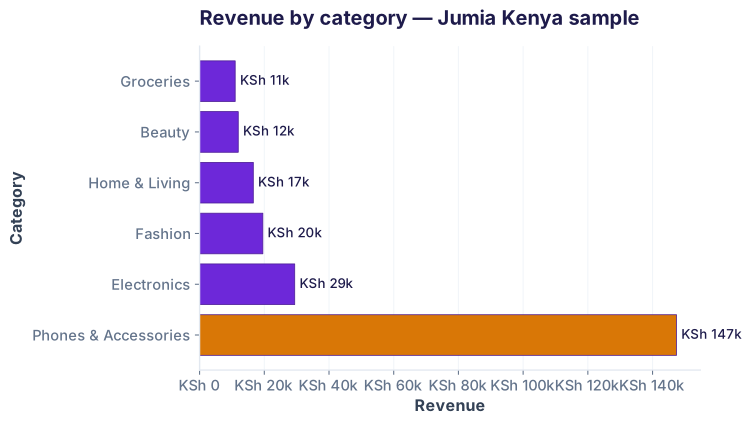
Now that data is flat, groupby becomes natural. Joseph groups by category to find his revenue drivers:
Authentication & headers for real APIs
Most APIs require authentication. Never hardcode keys. Use environment variables:
.env file or as shell environment variables. Add .env to .gitignore so you never accidentally commit it. Use python-dotenv to load at runtime.Pagination and rate limits
APIs don't return all data at once. They paginate. Respect rate limits — add time.sleep() between requests:
time.sleep() when paginating. Respect the API's rate limits (usually in response headers: X-RateLimit-Remaining). If you hit 429 (too many requests), back off exponentially: wait 1s, then 2s, then 4s.Where you see this
Industries & use cases
How this connects to AI
Every ML pipeline starts with data. Most real-world data lives in APIs or databases, not CSV files. Before you can train a churn model or recommendation system, you need to fetch, flatten, and clean data. json_normalize() is your first tool after requests.get(). The faster you can turn raw API responses into a clean DataFrame, the faster you iterate on models.
Mini Challenge
Task: Load the jumia_orders.json file. Flatten it with json_normalize() so each line item is a row. Then calculate total revenue per region and print the top 3 regions by revenue. Save the result to a CSV.
df.groupby('region')['price_ksh'].sum().sort_values(ascending=False).head(3) to find the top 3 regions. Then use .to_csv('region_revenue.csv') to save.
Interview questions
os.environ or a .env file with dotenv.
record_path='items' creates 3 rows, each with the same order_id but different item data.
print(response.text) to see the API's error message.
url = data.get('next_page_url'); while url: response = requests.get(url); data = response.json(); url = data.get('next_page_url').
Test your knowledge
record_path='items' do in json_normalize()?Cheatsheet
| Task | Code | Notes |
|---|---|---|
| Load JSON from file | import json; data = json.load(open('file.json')) |
Returns dict or list |
| Load JSON from API | import requests; r = requests.get(url); data = r.json() |
Use timeout=10 |
| Flatten JSON to DF | pd.json_normalize(data) |
For flat or simple nesting |
| Flatten nested array | pd.json_normalize(data, record_path='items') |
Explodes 'items' array into rows |
| Keep parent fields | pd.json_normalize(data, record_path='items', meta=['order_id']) |
'order_id' repeats in each row |
| Check response status | if r.status_code == 200: data = r.json() |
200 = OK, 401 = auth fail, 429 = rate limit |
| Add headers (auth) | headers = {'Authorization': f'Bearer {key}'}; r = requests.get(url, headers=headers) |
Never hardcode the key |
| Load from .env | from dotenv import load_dotenv; load_dotenv(); key = os.environ['KEY'] |
Protects secrets from version control |
| Add timeout | requests.get(url, timeout=10) |
Prevents hanging on slow servers |
| Rate limit: sleep | import time; time.sleep(0.2) |
Respect API rate limits; check headers |
Common pitfalls
response.status_code first. A 500 error returns HTML, not JSON. Call r.json() on 200 responses only.os.environ or a .env file. Add .env to .gitignore. Rotate keys regularly.timeout=10. If the server doesn't respond in 10s, the request fails cleanly instead of hanging forever.time.sleep(0.1) between paginated requests.pd.json_normalize(data, record_path='items'). Without it, the array stays as a column of lists — not a tidy DataFrame.Ready to load data from anywhere?
Join the Best AI Program: The AI-Era Analyst — 5 months, fully online, with placement assistance. Week 1 is free.
Explore The AI-Era Analyst →