
Thomas is a CA pivoting to financial data analysis at a Bangalore-based consumer fintech. His task: clean a vendor ledger from a consumer bank's payables system. Vendor names have inconsistent casing and suffixes ("PVT LTD" vs "Pvt. Ltd." vs "Private Limited"). Phone numbers are in mixed formats. GST numbers have spaces and lowercase. Email addresses have trailing whitespace and typos. Before analysis or reporting, the data must be standardized.
1. Why String Cleaning Matters: The Deduplication Problem
When you load vendor_ledger.csv into pandas, you get 58 rows. But how many truly unique vendors? Look at just the vendor_name column:
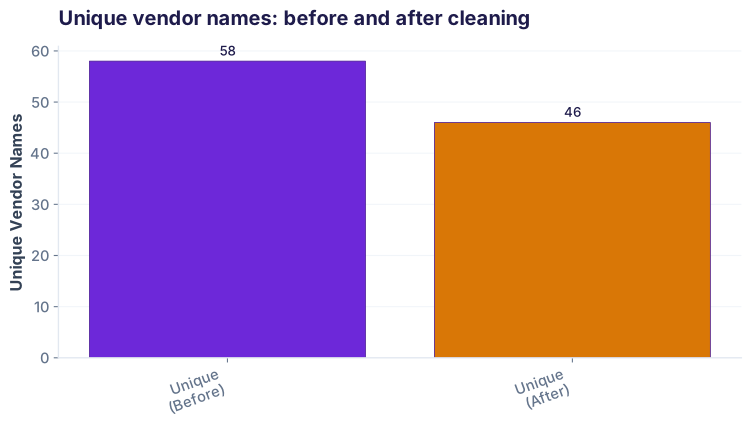
String cleaning unlocks three wins:
- Accurate aggregation: When you sum ₹amount by vendor_name, dirty data splits a single vendor across multiple rows, inflating counts and fragmenting insights.
- Reliable joins: In fintech, you join vendor ledger to master vendor tables (contact, category, rating). Mismatched strings = silent left-only rows and lost context.
- Compliance & reporting: Banks audit payables by unique vendor. If your system counts ACME Ltd and acme ltd as two vendors, your compliance report is wrong.
2. The .str Accessor: Your String Toolkit
Pandas' .str accessor lets you apply string methods to every element in a column without a loop. Here are the essentials:
| Method | Raw Data | Result | Use Case |
|---|---|---|---|
.str.strip() |
" acme " |
"acme" |
Remove leading/trailing whitespace |
.str.lower() |
"ACME PVT LTD" |
"acme pvt ltd" |
Standardize case |
.str.upper() |
"acme ltd" |
"ACME LTD" |
All caps (rare in cleaning) |
.str.title() |
"acme pvt ltd" |
"Acme Pvt Ltd" |
Title-case for names |
.str.replace(old, new) |
"PVT LTD" |
"Private Limited" |
Swap strings (no regex) |
.str.replace(pattern, repl, regex=True) |
"(+91)98765-43210" |
"+919876543210" |
Pattern matching & replace |
Example: Chain methods to clean vendor names
.str method returns a Series, so you can chain them. .strip() removes spaces, then .lower() lowercases the result.
3. Regex Patterns: Phone, Email, GST Normalization
For messy fintech data, simple string methods aren't enough. Regex patterns let you extract and standardize complex formats.
Phone number normalization to E.164 format
Raw phone data: "+91-9876543210", "919876543211", "0 98765 43212", "(+91) 98765-43213". Goal: all become "+919876543210".
\D = any non-digit. regex=True enables regex. The lambda handles left-padding with country code if needed.
Email cleanup and validation
Raw emails: "acme@acme.com ", "nexus.sales@nexus.in", "admin@acmecompany" (missing TLD). Goal: strip whitespace and flag invalid patterns.
^[\w\.-]+@[\w\.-]+\.\w+$ requires an @ and at least one dot after it. na=False means missing emails return False (not flagged as invalid).
GST number extraction and validation
India-specific: GST is 15 chars. Raw: "27AABCU9603R1Z5", "27 aabcu 9603 r1z5", "(27AABCU9603R1Z5)". Goal: uppercase, no spaces, validate format.
4. Flagging with .str.contains(): Find Issues Fast
In fintech data, you often need to flag rows for review. .str.contains() + regex lets you search for keywords or patterns case-insensitively.
Find refunds and reversals in descriptions
case=False matches "REFUND", "Refund", "refund" identically. na=False is critical—it treats missing data as non-matches (not flagged). Without it, NaN values return NaN instead of False, breaking your boolean index.
Why na=False matters
na=False in .str.contains() when filtering. If a row has NaN in the column and you do df[df['col'].str.contains(...)], pandas drops that row silently. Always use na=False unless you specifically want to exclude nulls.
5. Reusable Function: Standardize Vendor Suffixes
Vendor names in fintech ledgers often have legal suffixes that don't affect business identity. This function collapses them into one canonical form:
6. Common Pitfalls & How to Avoid Them
1. NaN handling in .str methods
If a cell is NaN, .str.lower() returns NaN, not an error. Check your result with .isna().sum() to ensure no unexpected nulls.
2. Forgetting na=False in .str.contains()
.str.contains('word') returns NaN for NaN cells, filtering them out. Always add na=False to treat missing as non-matches.
3. Greedy regex quantifiers
.* matches as much as possible. For emails, .*@.* matches "user1@domain.com user2@other.com" as one email. Use .+? (lazy) or be specific: [^@]+@[^@]+.
4. Case sensitivity creeping in
Clean phone→upper, then search for lowercase pattern. You won't find matches. Always normalize format first, then validate.
5. Losing original data during cleaning
Always clean into a new column (e.g., vendor_name_clean), not overwriting vendor_name. Audit teams and debugging need the raw values.
6. Not testing edge cases
Your regex works on "john@example.com" but fails on "alice+tag@domain.co.uk". Test with real data, especially international formats (UK, India, Kenya).
s.str.strip() do?.str.contains('pattern') and .str.contains('pattern', case=False)?na=False to .str.contains()?Ready to apply these skills?
Join the Best AI Program: The AI-Era Analyst — 5 months, fully online, with placement assistance. Week 1 is free.
Explore The AI-Era Analyst →