
Thomas is a chartered accountant in Kochi, recently pivoted to financial data analysis at a Bangalore fintech. This week: quarterly close. The CFO asks him to merge ledger exports from 3 legacy systems for a consolidated reconciliation report.
Problem: each system exports dates differently. SouthBank's Mumbai branch sends "2026-03-15". The Hyderabad branch exports "15/03/2026". A third exports "March 15, 2026". The amounts are strings with commas: "₹12,400.50". Every analysis operation—sorting by date, summing by month, filtering by transaction type—hangs until the types are fixed.
The transformation: from object to proper dtypes
The left panel shows raw data: all columns are object dtype (pandas' catch-all for "I don't know"). The right panel shows after type conversion: numbers are numeric, dates are datetime, categories are category. This small change unlocks everything.
Why dtype matters: 5 operations that break silently
When you have the wrong dtype, pandas doesn't crash—it gives you wrong answers silently.
| Operation | Expected dtype | What fails if you use object |
|---|---|---|
| Sort by date | datetime64[ns] | Alphabetical sort: "2026-01-30" comes before "2026-01-05" ❌ |
| Sum amounts | int64 / float64 | String concatenation: "100" + "200" = "100200" ❌ |
| Filter by category | category | Case sensitivity: "Kochi" ≠ "kochi" ❌ |
| Extract month from date | datetime64[ns] | No .dt accessor: "2026-03-15".dt.month → AttributeError ❌ |
| Memory usage for 10M rows | category (if <100 unique) | Object wastes 40–50x more RAM than category ❌ |
Example that shows the danger: You have transaction amounts as strings: "1000" and "999". Sorting them alphabetically gives "1000" < "999" — wrong. In SQL reports, you'd catch this. In pandas without proper types, it silently corrupts your analysis.
Casting: 3 essential conversions
1. Object → float (removing currency symbols and commas)
Transaction amounts often come as strings with ₹ prefix and comma grouping. Strip, convert, handle nulls.
| Before conversion | Type |
|---|---|
| ₹12,400.00 | object |
| 7,500.50 | object |
| 25,000 | object |
| After conversion | Type |
|---|---|
| 12400.0 | float64 |
| 7500.5 | float64 |
| 25000.0 | float64 |
2. Object → category (memory explosion for low-cardinality columns)
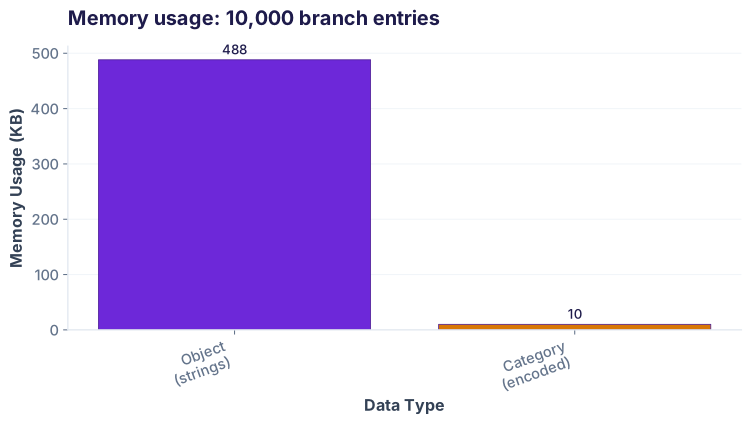
Columns like branch with only 5 unique values (Kochi, Hyderabad, Bangalore, Chennai, Delhi) repeat thousands of times. Using category cuts memory by 95% because pandas stores a number (0–4) instead of the full string each row.
3. Object → bool (standardizing inconsistent Y/N patterns)
The is_reconciled column has mixed formats: "Y", "N", "yes", "no", "TRUE", "FALSE". Convert to clean boolean.
df[df['is_reconciled'] == True] instead of hunting for all the case variants.
The date parsing problem: 4 formats in one column
This is Thomas's core pain point. The three systems export dates in 4 different formats, all as strings.
| Raw txn_date | Source system | Problem |
|---|---|---|
| 2026-03-15 | Mumbai API | ISO format |
| 15/03/2026 | Hyderabad export | DD/MM/YYYY (European) |
| March 15, 2026 | Chennai human | English month name |
| 15-Mar-26 | Legacy Unix | Abbreviated month |
Without a solution, every date operation fails:
The solution: pd.to_datetime with format='mixed' and dayfirst=True
Pandas can auto-detect most formats if you hint that day comes before month (crucial in India).
| After parsing | Type | Sortable? |
|---|---|---|
| 2026-03-15 | datetime64[ns] | ✓ |
| 2026-03-15 | datetime64[ns] | ✓ |
| 2026-03-15 | datetime64[ns] | ✓ |
| 2026-03-15 | datetime64[ns] | ✓ |
What if one date is totally garbage? errors='coerce' turns it into NaT (Not a Time), pandas' null for dates. You can then find and investigate:
The silent timezone bug
Many ledger systems log timestamps as UTC. But transaction cutoff for daily/monthly closes is in local time (IST for Kochi, 5.5 hours ahead of UTC). A transaction at 23:55 UTC might be 5:25 AM IST the next day—pushing it into a different period.
| Timestamp (UTC) | IST (Kochi) | Period |
|---|---|---|
| 2026-03-15 23:55:00 UTC | 2026-03-16 05:25:00 IST | April reporting? |
| 2026-03-16 18:30:00 UTC | 2026-03-17 00:00:00 IST | March reporting |
Extracting date parts for grouping and analysis
Once dates are properly parsed, pandas gives you the .dt accessor to slice them by year, month, day of week, etc.
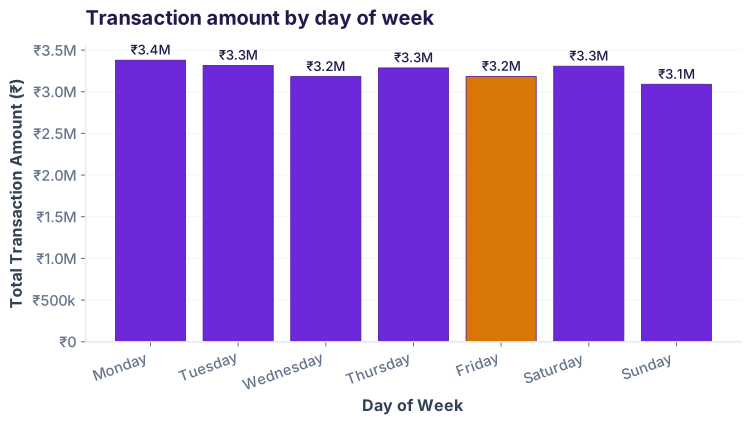
Example: Which day of the week has the highest transaction volume?
Cheatsheet: dtype conversions at a glance
| Task | Code | Result dtype |
|---|---|---|
| String → int | df['col'] = df['col'].astype('int64') |
int64 |
| String → float (remove commas) | pd.to_numeric(df['col'].str.replace(',',''), errors='coerce') |
float64 |
| String → bool (Y/N → True/False) | df['col'].str.lower().isin(['y', 'yes', 'true']) |
bool |
| String → category (low cardinality) | df['col'] = df['col'].astype('category') |
category |
| String → datetime (ISO) | pd.to_datetime(df['col'], format='%Y-%m-%d') |
datetime64[ns] |
| String → datetime (mixed formats) | pd.to_datetime(df['col'], format='mixed', dayfirst=True, errors='coerce') |
datetime64[ns] |
| Datetime → year | df['col'].dt.year |
int64 |
| Datetime → month | df['col'].dt.month |
int64 |
| Datetime → day name | df['col'].dt.day_name() |
object |
| Datetime → quarter | df['col'].dt.quarter |
int64 |
| Datetime → month-year period | df['col'].dt.to_period('M') |
period[M] |
| UTC → IST timezone | df['col'].dt.tz_localize('UTC').dt.tz_convert('Asia/Kolkata') |
datetime64[ns, Asia/Kolkata] |
Mini challenge: clean the messy ledger
Your data has:
amount_inras string with ₹ and commastxn_datein 4 different formatsis_reconciledwith mixed "Y", "N", "yes", "no"branchwith only 5 unique values
Steps:
- Clean
amount_inrto float64 - Parse
txn_dateto datetime64[ns] - Filter for March 2026
- Sum the amounts
df['txn_date'].dt.month == 3 will only work if txn_date is datetime. Use pd.to_datetime with format='mixed' and dayfirst=True.
5 common pitfalls
errors='raise', a single bad date kills the whole parse. Always use errors='coerce' to turn unparseable values into NaN, then investigate with df[df['col'].isna()].dayfirst=True for India.df['branch'] = df['branch'].cat.add_categories(['New Branch'])df['col'].astype('float64').astype('Int64')Interview prep: 5 questions
String comparison is alphabetical: "1000" < "999" because character '1' comes before '9'. Numeric comparison correctly gives 999 < 1000. Always convert amounts to numeric types (float64, int64) before sorting or aggregating.
It converts unparseable values to NaN (or NaT for dates) instead of raising an exception. This lets your pipeline continue; you investigate bad rows separately. Without it, a single typo ("2026-02-30") crashes the entire parse.
Yes, absolutely. 10M object values (8 bytes + string overhead ≈ 40 bytes each) uses ~400 MB. Category stores integers (0–49) plus a lookup table, using ~40 MB. That's a 10x compression. Plus, groupby, merge, and comparisons are faster on category.
Use pd.to_datetime(df['col'], format='mixed', dayfirst=True, errors='coerce'). The format='mixed' infers each value's format independently. dayfirst=True handles DD/MM formats. Any unparseable rows become NaT for manual review.
The next day. 2026-03-15 23:55 UTC = 2026-03-16 05:25 IST. Always convert UTC to the business timezone before filtering or grouping by date. Use df['ts'].dt.tz_localize('UTC').dt.tz_convert('Asia/Kolkata'), then extract date or day. Missing this causes off-by-one errors in daily closes.
Knowledge check: 5 quick questions
Also used in fintech
Domain connections
LLM-assisted parsing: when format='mixed' fails
Occasionally, a date is in a completely non-standard format: "15th of March, 2026" or "2026.03.15" (Chinese style). If format='mixed' gives NaT, you can ask an LLM to rewrite it to ISO format, then parse:
# "Rewrite this date in ISO format YYYY-MM-DD: 15th of March, 2026"
# → "2026-03-15"
# Then re-parse
df.loc[mask, 'date'] = cleaned_dates.apply(lambda x: pd.to_datetime(x, format='%Y-%m-%d'))
This is rare—format='mixed' handles 99% of real-world messiness—but useful for legacy hand-entered data.
Ready to go further?
Join the Best AI Program: The AI-Era Analyst — 5 months, fully online, with placement assistance. Week 1 is free.
Explore The AI-Era Analyst →