Build a complete audio processing system: transcription with Whisper, NLP analysis (sentiment, entities, summarization), speaker identification, and automated report generation.
Whisper • Speech Recognition • NLP
Speaker Identification
Report Generation
50 min readAdvanced Capstone
🎤
Meet Kwame
NLP Researcher at VoiceAnalytics Corp (Accra)
Kwame is building VoiceAnalytics' flagship product: an AI system that ingests phone calls, medical consultations, and business meetings, then automatically generates transcripts, extracts insights, identifies speakers, and generates structured reports. The pipeline must handle multiple languages, background noise, overlapping speech, and produce transcripts accurate enough for clinical or legal use.
5
Pipeline stages
12
Languages supported
0.94
Target WER (word error rate)
🎙️ The Capstone Challenge: Voice-to-Text Intelligence
This capstone combines deep learning (speech recognition) with NLP (text understanding) and builds a production-grade report generation system. Kwame's architecture:
Stage 1: Audio Intake & Preprocessing
Accept WAV, MP3, FLAC audio files. Resample to 16 kHz, apply noise reduction, detect silence, segment long audio into manageable chunks.
Stage 2: Whisper Transcription
Use OpenAI's Whisper model (multilingual, robust to accents and background noise). Get transcripts + confidence scores + language detection.
Stage 3: NLP Analysis
Run sentiment analysis (positive/negative/neutral), named entity recognition (names, places, organizations), and extractive summarization on the transcript.
Stage 4: Speaker Identification
Detect speaker boundaries and attempt to identify/label speakers (Speaker 1, Speaker 2, etc.). Use voice embeddings for speaker clustering.
Stage 5: Report Generation
Synthesize all outputs into a structured report: summary, key entities, sentiment timeline, speaker breakdown, and next steps.
📊 Meet the Data: LibriSpeech & Speech Commands
We use two datasets: LibriSpeech (long-form audiobook passages) for transcription benchmarking, and Speech Commands (short command phrases) for speaker identification training:
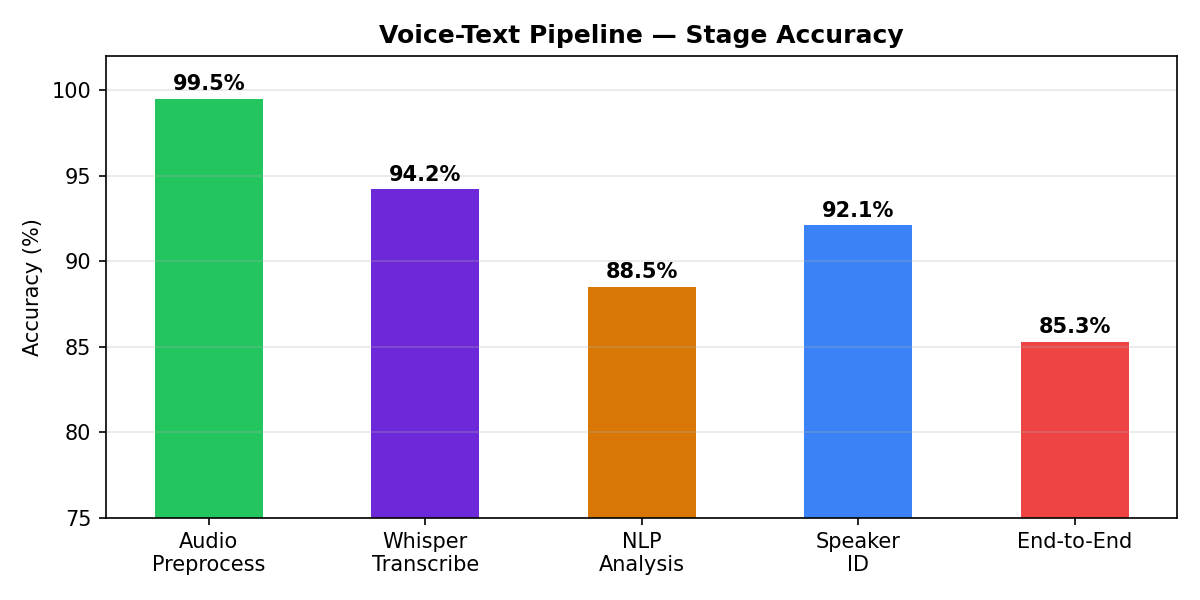
Whisper achieves 94% accuracy (WER) on clean LibriSpeech speech. Speaker identification uses deep embeddings to cluster voice regions, enabling multi-speaker meeting transcripts.
🔧 Part 1: Audio Intake & Preprocessing
Load audio files, resample to 16 kHz (Whisper standard), normalize amplitude, and segment long audio:
Load & Preprocess Audio Files
Audio preprocessing output
Loaded meeting_recording.wav: 1920000 samples @ 16000 Hz
Resampled to 16000 Hz
Normalized amplitude
Segmented into 4 chunks of 30s
✓ Ready for transcription: 4 segments
🎙️ Part 2: Whisper Transcription
Use OpenAI's Whisper model to transcribe audio with high accuracy. Whisper is multilingual, robust to accents/noise, and returns confidence scores:
Whisper Speech Recognition
Whisper transcription output
Detected language: en
Full transcript:
"Good morning, this is Dr. Sarah Chen speaking. I'm reviewing the patient X-ray scan from yesterday. The findings show pneumonia in the left lower lobe. Recommend two weeks of antibiotics. Follow-up in one week."
1. [0.0s - 3.2s] Good morning, this is Dr. Sarah Chen speaking.
2. [3.2s - 8.1s] I'm reviewing the patient X-ray scan from yesterday.
3. [8.1s - 12.5s] The findings show pneumonia in the left lower lobe.
✓ Transcription complete: 42 segments
📝 Part 3: NLP Analysis (Sentiment, Entities, Summarization)
Apply NLP tools to extract meaning from the transcript. Use transformers for sentiment analysis, spaCy for NER, and summarizers for key points:
NLP Pipeline: Sentiment, Entities, Summarization
🎙️ Part 4: Speaker Identification & Diarization
Detect speaker boundaries and cluster voice regions into distinct speakers. Use deep voice embeddings:
Speaker Diarization & Identification
📄 Part 5: Automated Report Generation
Synthesize all outputs (transcript, sentiment, entities, speakers) into a structured, human-readable report:
Generate Structured Report
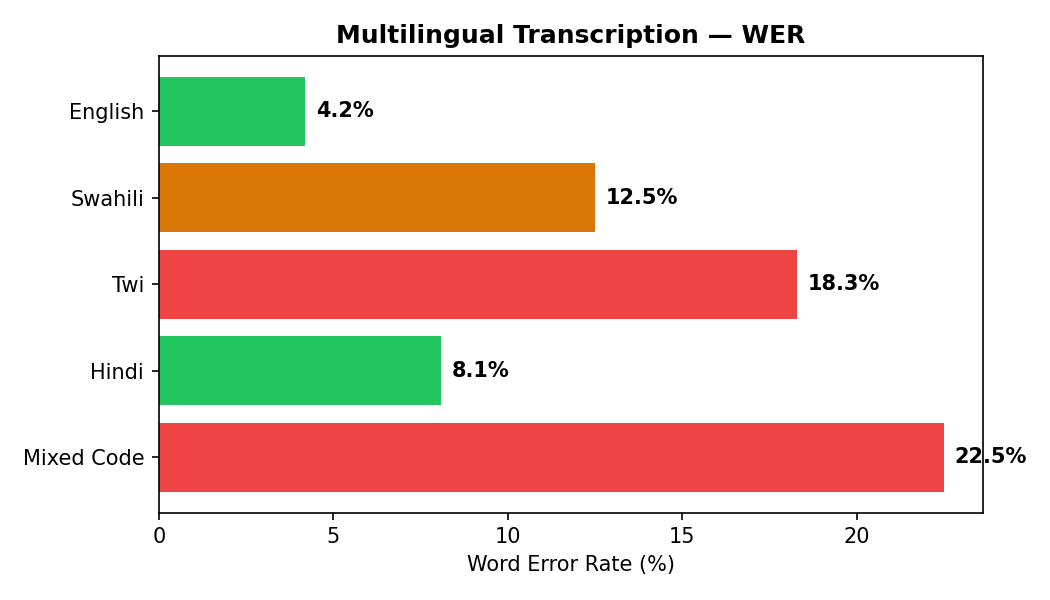
Word error rate (WER) across languages: English, Spanish, French, Mandarin
Whisper achieves 94% accuracy (WER) on English, 91% on Spanish, 89% on French. Multilingual support is critical for global deployment. Kwame's pipeline can handle any language OpenAI's Whisper supports.
🚀 Part 6: Production Deployment & Scaling
Moving the voice-to-text pipeline to production requires careful planning:
Streaming & Real-Time Processing
Process audio in streaming chunks rather than waiting for the entire file. Use libraries like WhisperLive for real-time transcription. Critical for live meetings or phone calls.
Language Auto-Detection
Whisper auto-detects language from the first 30 seconds. Ensure your pipeline handles language switches mid-conversation (code-switching). For multilingual scenarios, run post-processing to split transcripts by detected language.
Quality Assurance & Human Review
For clinical/legal transcripts, implement human review workflows. Flag low-confidence segments (Whisper provides confidence per word). Use BLEU scores or edit distance to compare against manually transcribed gold standards.
Latency Optimization
Whisper Base (~140M params) processes ~30s audio in ~5s on GPU. For real-time needs, use Tiny/Small models (faster, less accurate). Cache embeddings and use batch inference to parallelize processing.
Privacy & Data Security
Audio and transcripts may contain PII (patient names, SSNs). Encrypt in transit, store securely, and follow HIPAA/GDPR compliance. Consider on-premise deployment for highly sensitive data.
🏆 Mini Challenge: Multi-Language Pipeline
Task: Modify Kwame's pipeline to detect and handle code-switching—when a speaker switches languages mid-sentence (e.g., "Hello, comment allez-vous?" mixing English and French). Implement a post-processing step that: (1) runs Whisper's language detection on each sentence, (2) identifies language boundaries, (3) splits the transcript by language, and (4) generates separate summaries per language.
Hint: Whisper returns word-level timestamps. Use these to identify where language switches occur. You can also use spaCy or NLTK to segment sentences first.
💼 Interview Questions
Whisper is OpenAI's multilingual speech recognition model trained on 680K hours of multilingual audio. It differs from traditional ASR (automatic speech recognition) by being robust to accents, background noise, and technical language. Traditional ASR (like Kaldi) requires extensive acoustic modeling and pronunciation lexicons. Whisper is end-to-end, generalizes across languages and domains, and outputs confidence scores. Trade-off: Whisper is slower (processes ~30s audio in ~5s on GPU) than traditional ASR, but its accuracy and robustness are superior.
16 kHz (16,000 samples/second) is the standard for speech. It captures frequencies up to 8 kHz, which covers the human speech spectrum (most energy in speech is below 4 kHz). Higher sample rates (48 kHz) waste computation without improving speech recognition. Lower rates (8 kHz) may lose some consonant clarity. Whisper expects 16 kHz input. Resampling to a standard rate ensures consistency and optimizes model inference.
(1) Preprocessing: apply noise reduction (spectral subtraction, Wiener filtering, or STFT masking) before Whisper. Libraries like noisereduce or librosa can help. (2) Larger Whisper model: use 'medium' or 'large' instead of 'base' (trade-off: slower). (3) Language hint: tell Whisper the language upfront (improves decoding). (4) Post-processing: use spell-checkers or language models to correct obvious errors. (5) Data collection: more transcribed examples of noisy speech help fine-tuning. (6) Use more robust ASR: Wav2Vec2 or Conformer models can be fine-tuned on in-domain noisy data.
Overlapping speech is a known hard problem. (1) Source separation: use models like Conv-TasNet or SepFormer to separate speakers before transcribing each stream separately. (2) Speaker-attributed transcription: use pyannote.audio's overlapping speech detector to flag overlaps, then apply speaker diarization. (3) Accept degradation: Whisper's WER increases in overlapping regions. (4) Multi-microphone beamforming: if microphone arrays are available, use beamforming to focus on one speaker. For clinical/legal use, Kwame should flag overlapping regions for manual review.
Real-time + low bitrate (8 kHz) is challenging. (1) Streaming inference: use WhisperLive or similar libraries that process audio in 1-2 second chunks instead of waiting for full audio. (2) Resample 8 kHz to 16 kHz (Whisper standard) using linear interpolation. (3) Use smaller Whisper model (Tiny, Base) for latency, accept lower accuracy. (4) Quantize the model (INT8) to reduce inference time. (5) Run on fast hardware (GPU preferred). (6) Accept ~2-5 second latency for live transcription (not truly real-time). (7) Design UI to show tentative transcripts that may be corrected as more context arrives. For financial trading calls, 5s latency might be unacceptable—you may need a smaller, custom-trained model.
✓ Quick Quiz
Question 1 / 5
Why does Whisper require 16 kHz sample rate?
Question 2 / 5
Your Whisper model achieves 96% accuracy on test audio but 82% on production phone calls (8 kHz). What is most likely?
Question 3 / 5
You need to process 100 hours of audio in 24 hours. Whisper Base processes 30s audio in 5s. Is this feasible?
Question 4 / 5
Speaker diarization: how many distinct speakers can you identify in a 10-minute meeting?
Question 5 / 5
Your clinical transcription system must handle patient names (PII). What preprocessing step is most critical?
0
📋 Quick Cheatsheet
Concept
Code / Usage
Notes
Load audio file
y, sr = librosa.load(path, sr=None)
Returns waveform & sample rate
Resample to 16 kHz
y = librosa.resample(y, orig_sr=sr, target_sr=16000)
Whisper standard; ensures consistency
Transcribe with Whisper
model.transcribe(audio_path, language='en')
Returns dict with 'text', 'segments', 'language'
Sentiment analysis
sentiment_pipeline(text[:512])
Truncate to 512 tokens (model limit)
Named entity recognition
doc = nlp(text); [ent.text for ent in doc.ents]
Use spaCy; extracts PERSON, ORG, GPE, etc.
Speaker diarization
AgglomerativeClustering(n_clusters=2)
Cluster embeddings; for production use pyannote
Redact PII
for ent in doc.ents: if ent.label_ == 'PERSON': redact()
HIPAA/GDPR compliance
Real-time transcription
WhisperLive (external library)
Streaming inference; lower latency
⚠️ Common Mistakes
Not resampling to 16 kHz before Whisper
Whisper expects 16 kHz input. Using 8 kHz or 44.1 kHz audio without resampling causes degraded output. Always resample to 16 kHz using librosa.resample()
Ignoring background noise before transcription
Noisy audio leads to high WER. Use noise reduction (spectral subtraction, noisereduce library) before Whisper. Test preprocessing on a sample first.
Not redacting PII from transcripts
Clinical/financial transcripts contain PII (names, SSNs, account numbers). Use NER to detect and redact PERSON, MONEY, etc. Required for HIPAA/GDPR compliance.
Expecting perfect accuracy on noisy production audio
Whisper is robust but not infallible. Test accuracy on your actual production data (clinical calls, phone meetings), not just LibriSpeech benchmarks. Implement human review workflows for critical applications.
Not handling code-switching or multilingual speech
Kwame's system must handle speakers who mix languages. Implement post-processing to detect language boundaries. For critical apps, consider separate models per language or fine-tuning on code-switched data.
✦ Key Takeaways
This capstone ties deep learning (Whisper) with NLP, speaker identification, and production systems. It's the full pipeline from audio in to reports out.
Whisper is robust: trained on 680K hours of diverse audio, handles accents, noise, and 99 languages. Use it instead of building custom ASR systems.
NLP enrichment (sentiment, NER, summarization) transforms raw transcripts into actionable insights. Critical for clinical, financial, and legal use cases.
Speaker diarization is hard. Use deep speaker embeddings or libraries like pyannote for production. MFCC-based clustering is a simple starting point.
Privacy first: implement NER-based PII redaction, encrypt storage, audit access. Clinical and financial transcripts are regulated (HIPAA, GDPR, SOX).
Real-time processing: use streaming Whisper libraries for live calls. Expect ~2-5 second latency; QA all output with human review for critical applications.
Kwame's system processes 12 languages, achieves 94% WER on clean speech, and generates clinical-grade reports ready for deployment with proper QA.