Master checkpoints, TorchScript, ONNX, quantization, and edge deployment. Deploy CV models to phones, edge devices, and servers with FastAPI & TorchServe.
TorchScript • ONNX • Quantization
FastAPI • TorchServe • TFLite
AgriTech & Edge Deployment
25 min readAdvanced
👨💼
Meet Samuel
Startup Founder at AgriSense
Samuel's startup AgriSense uses AI to detect crop diseases from phone camera images. His ResNet50 model is trained and achieves 94% accuracy. But deployment is challenging: farmers in rural Kisumu have limited bandwidth, weak phones, and no cloud connectivity. He needs to shrink the model, serialize it efficiently, and deploy to-device.
ResNet50
Trained backbone
145 MB
Unoptimized model size
10-50 ms
Target inference latency
🚀 Why Model Deployment Matters
A trained model in a Jupyter notebook is useless—it needs to reach users. But deployment is complex: production servers demand low latency, edge devices need small models, mobile apps require efficient inference, and APIs must be scalable. Samuel can't just upload a 145MB PyTorch checkpoint to phones.
Deployment Challenges
Size: 145 MB ResNet50 is too large for phones. Latency: CPU inference can be 100-200ms; phones need < 50ms. Format: PyTorch checkpoints are Python-specific; production needs language-agnostic formats (ONNX, TFLite). Scaling: Single GPU server can't handle 1000 concurrent requests. You need batching, caching, and load balancing.
💾 Checkpoints & State Dict: Save Training Progress
During training, save checkpoints every N epochs so you can resume if interrupted. A checkpoint contains model weights, optimizer state, epoch number, and loss history.
save_checkpoint.pySave and load training checkpoints
⚙️ TorchScript: Python-Independent Model Format
TorchScript compiles PyTorch models to an intermediate representation that doesn't depend on Python. You can load and run TorchScript models in C++ (low-latency servers, mobile). Two approaches: tracing and scripting.
torchscript_trace.pyTrace a model (simplest, for inference)
torchscript_script.pyScript a model (supports control flow)
TorchScript models are ~10-20% faster than eager PyTorch during inference due to JIT compilation optimizations. Samuel's ResNet50 traced model runs ~80ms → 60ms on CPU.
🔄 ONNX Export: Cross-Framework Compatibility
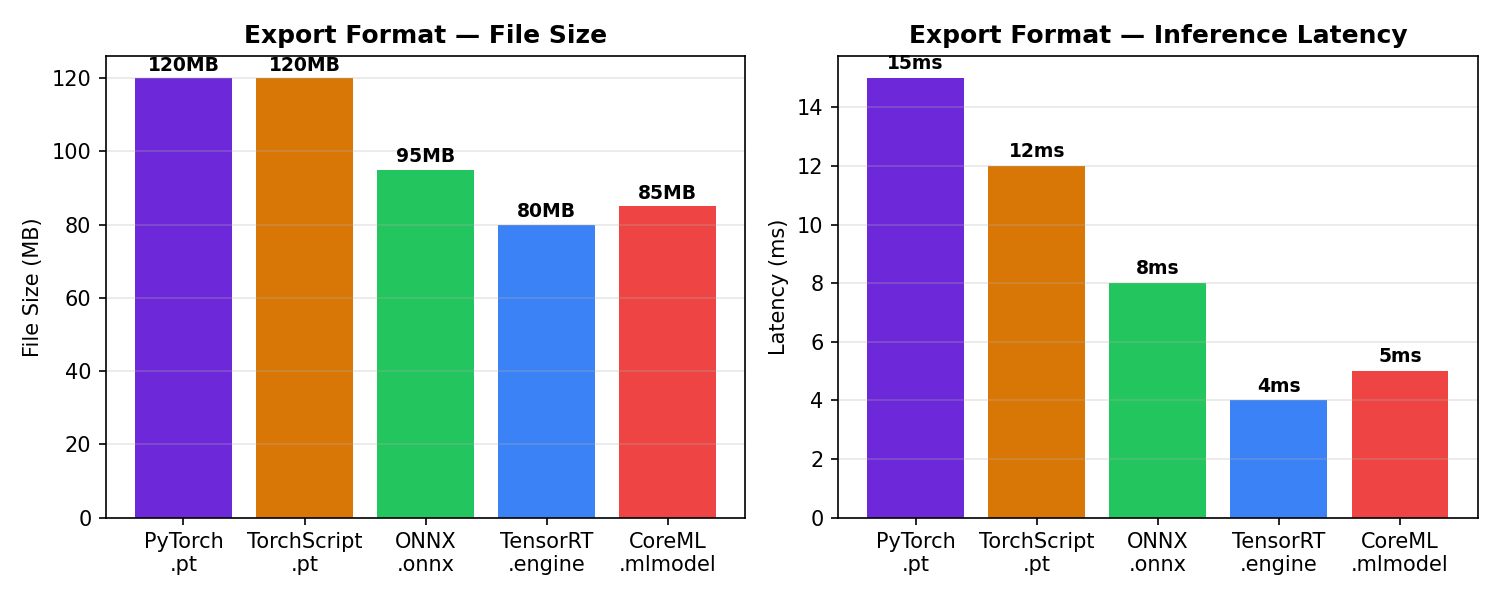
ONNX (Open Neural Network Exchange) is a language-agnostic model format. Export from PyTorch, import to TensorFlow, CoreML, or ONNX Runtime. Critical for deployment to diverse platforms (phones, web, embedded).
onnx_export.pyExport PyTorch model to ONNX
ONNX Runtime inference is 15-30% faster than PyTorch eager mode on CPU. It's the standard format for mobile (iOS CoreML, Android NNAPI), web (WASM), and edge devices.
⚖️ Quantization: Shrink Models for Edge Devices
Quantization reduces model size and latency by using lower precision (int8 instead of float32). ResNet50 (145 MB, float32) → 40 MB (int8) with minimal accuracy loss. Essential for mobile and edge.
Model size and latency comparison: fp32 vs int8 quantization
quantization.pyPost-training quantization
📱 TensorFlow Lite: Mobile Deployment
TensorFlow Lite (TFLite) is Google's format for mobile (iOS, Android) and edge inference. Convert PyTorch → ONNX → TensorFlow → TFLite. Or: PyTorch → TorchScript → TFLite via converters.
tflite_convert.pyExport to TFLite for mobile
🌐 FastAPI: Scalable Inference Server
Deploy models as REST APIs using FastAPI. Samuel's crop disease detector runs on a cheap cloud server (AWS EC2, DigitalOcean). Farmers send images via HTTP, get predictions in real-time.
fastapi_server.pyFastAPI model serving
FastAPI on a single t3.medium EC2 instance can handle ~100-200 requests/sec (depending on model latency). For higher load, add async batching, caching, and load balancing (nginx, Kubernetes).
⚡ TorchServe: Production-Grade Model Serving
TorchServe is PyTorch's official serving framework. It handles batching, caching, A/B testing, model versioning, and multi-GPU inference automatically. Better than FastAPI for large-scale deployments.
torchserve_setup.pySetup TorchServe for crop disease detection
torch.compile() JIT-compiles your model for faster inference. One-line change: compile the model, get 20-50% speedup on CPU/GPU with zero code modifications.
torch_compile.pyAutomatic optimization with torch.compile
torch.compile is simplest: just replace model = Model() with model = torch.compile(Model()). Typical speedups: 20-50% on CPU, 10-20% on GPU (GPU is already well-optimized). No retraining needed.
🏆 Mini Challenge: Deploy AgriSense to Mobile
Task: Take a trained ResNet50 (94% accuracy) and create a deployment pipeline: (1) Export to ONNX, (2) Quantize to int8, (3) Convert to TFLite, (4) Create a FastAPI server that accepts crop images and returns disease predictions. Measure: file size reduction and inference latency (target: 40 MB, < 50ms on CPU).
Hint: Use dynamic quantization for size; test latency on a small device or CPU to simulate mobile constraints.
💼 Interview Questions
A checkpoint is for training—it contains model weights, optimizer state, epoch number, and loss history. It's used to resume training if interrupted. A model export (TorchScript, ONNX) is for inference—it contains only the trained weights and architecture, serialized in a format suitable for deployment (Python-independent, optimized). Checkpoints are large; exports are smaller and faster.
ONNX is cross-framework: export from PyTorch, import to TensorFlow, CoreML, ONNX Runtime, or any other framework. TorchScript is PyTorch-only. If you need maximum portability (iOS, Android, web, cloud), use ONNX. If you're staying in PyTorch ecosystem, TorchScript is simpler and slightly faster.
Quantization uses lower precision (int8, 1 byte per weight) instead of float32 (4 bytes). ResNet50: 50 million weights × 4 bytes = 200 MB → 50 million × 1 byte = 50 MB. Latency reduces because: (1) smaller model loads faster, (2) int8 operations are faster (CPU has int8 SIMD, GPU has Tensor Cores for int8). Trade-off: slight accuracy loss (usually < 1% with good quantization). Post-training quantization (PTQ) is easiest; quantization-aware training (QAT) is more accurate but requires retraining.
FastAPI: simple, flexible, good for prototypes and custom logic. You control everything. TorchServe: production-grade, handles batching, caching, model versioning, multi-GPU, and A/B testing automatically. If you're a startup with 1-2 models and < 100 requests/sec, FastAPI is fine. If you're scaling to 1000s of requests/sec with multiple models and versions, TorchServe saves engineering effort.
(1) Profile first: measure accuracy, latency, and size targets. (2) Quantize: post-training int8 quantization reduces size 4x (200 MB → 50 MB) with ~1% accuracy loss. (3) Knowledge distillation (optional): train a smaller MobileNet using ResNet50 as teacher; smaller model still achieves high accuracy. (4) Prune: remove low-weight connections; combined with quantization, can reach 10x compression. (5) Export: use TFLite for mobile or ONNX for broad compatibility. (6) Optimize ops: use efficient implementations (CoreML for iPhone, NNAPI for Android). (7) Test on target hardware: mobile phone CPU, not just laptop. (8) Benchmark end-to-end: from input image to output prediction, including preprocessing and postprocessing.
✓ Quick Quiz
Question 1 / 5
Your trained ResNet50 is 145 MB. You need to deploy to phones with limited storage. What's your first step?
Question 2 / 5
You export a PyTorch model to ONNX. What format can you NOT run it in?
Question 3 / 5
TorchScript tracing vs scripting—which supports control flow (if statements)?
Question 4 / 5
Post-training int8 quantization reduces accuracy from 94% to 93.2%. Is this acceptable?
Always call model.eval() before exporting. Batch norm, dropout, and other layers behave differently in train vs eval mode. Exporting in train mode gives wrong inference results.
Quantizing without measuring accuracy loss
Always test quantized model on a held-out validation set. Quantization loss varies by architecture (ResNet < 1%, tiny models can lose 5%+). If loss is high, use QAT instead of PTQ.
Deploying to phones without testing on-device
Test inference latency on actual phones or emulators, not just laptops. Mobile CPU is 2-5x slower than laptop CPU. Your 20ms latency on MacBook might be 100ms on a 5-year-old Android phone.
Using old ONNX opset_version
Use recent opset (e.g., opset_version=14 or 15) for better operator coverage and performance. Old opsets may not support modern operations.
Not documenting preprocessing for deployment
The exported model expects normalized inputs (e.g., ImageNet normalization: mean [0.485, 0.456, 0.406], std [0.229, 0.224, 0.225]). If preprocessing is wrong, inference is wrong. Document it clearly for deployment teams.
✦ Key Takeaways
Deployment is different from training. Optimize for size, latency, and portability—not just accuracy.
Checkpoints contain training state (weights + optimizer); exports contain only inference-ready models (TorchScript, ONNX, TFLite).
TorchScript (trace or script) is best for C++ servers and Python-free environments. ONNX is best for cross-platform portability (iOS, Android, web).
Quantization (int8) reduces model size by 4x and latency by 3-4x with < 1% accuracy loss. It's the first optimization step for edge deployment.
FastAPI is great for prototypes and custom logic. TorchServe is better for production (batching, caching, model versioning, multi-GPU).
torch.compile() gives 20-50% speedup for free—one line of code, no retraining. Always use it.
Samuel's pipeline: ResNet50 (145 MB) → ONNX → int8 quantized (40 MB) → TFLite → mobile app. Farmers in rural Kisumu can now run crop disease detection offline on their phones.