
Grace works as a business analyst at Safaricom in Nairobi. For 4 years, she has analysed customer behaviour in Excel: pivot tables, VLOOKUPs, macros. But this week, the data warehouse dumped a CSV with 2 million call detail records (CDRs)—every call, every text, every data session for March 2026.
She opens the file in Excel. It crashes.
She opens it with her laptop's default text editor. 40 MB of raw comma-separated values scrolls endlessly. She can't see any patterns. Then she learns Python, loads the data with pandas in 3 seconds, and spots the insight in minutes.
The transformation: from raw text to queryable table
This is the core of data analysis—turning chaos into insight. Below, the same CSV data appears twice: left as it lives in a text editor, right as pandas transforms it.
pd.read_csv()
| caller_id | callee_id | timestamp | duration_s |
|---|---|---|---|
| 254712345678 | 254787654321 | 2026-03-15 08:15:30 | 45 |
| 254712345679 | 254787654322 | 2026-03-15 08:42:15 | 120 |
| 254712345680 | 254787654323 | 2026-03-15 09:05:00 | 78 |
| 254712345681 | 254787654324 | 2026-03-15 09:33:45 | 200 |
| 254712345682 | 254787654325 | 2026-03-15 10:12:10 | 65 |
read_csv essentials: the 3-second load
The simplest case: a well-formed CSV in the same folder as your Python file.
| caller_id | callee_id | timestamp | duration_s | network_type | region_code | |
|---|---|---|---|---|---|---|
| 0 | 254712345678 | 254787654321 | 2026-03-15 08:15:30 | 45 | 4G | 001 |
| 1 | 254712345679 | 254787654322 | 2026-03-15 08:42:15 | 120 | 4G | 042 |
| 2 | 254712345680 | 254787654323 | 2026-03-15 09:05:00 | 78 | 3G | 001 |
| 3 | 254712345681 | 254787654324 | 2026-03-15 09:33:45 | 200 | 4G | 007 |
| 4 | 254712345682 | 254787654325 | 2026-03-15 10:12:10 | 65 | 4G | 001 |
The 8 parameters that fix 95% of messy CSVs
Real-world CSV files are messy. Headers in the wrong row. Semicolons instead of commas. Dates stored as text. Leading zeros stripped. Here are the 8 most important parameters to fix these issues:
| Parameter | What it does | Example |
|---|---|---|
| sep= | Column separator (default: ','). Use for European CSVs with semicolons. | sep=';' |
| header= | Which row is the header (default: 0). Set to 1 if header is on row 2. | header=1 |
| names= | Supply your own column names instead of reading from file. | names=['a','b','c'] |
| usecols= | Load only these columns (saves memory on huge files). | usecols=['date','amount'] |
| dtype= | Force a column's data type (e.g., preserve leading zeros). | dtype={'id': str} |
| parse_dates= | Parse specified columns as datetime, not string. | parse_dates=['date'] |
| na_values= | Treat these strings as null (NaN). Useful for N/A, --, null variants. | na_values=['N/A','--'] |
| nrows= | Load only the first N rows. Great for previewing huge files. | nrows=1000 |
3 real scenarios where these parameters save the day
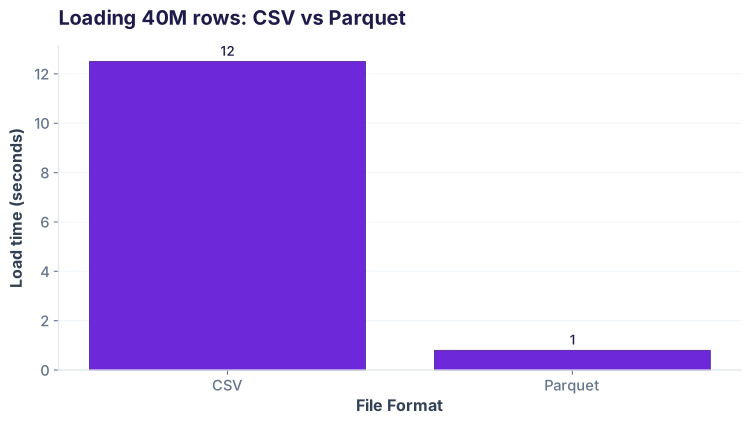
Scenario A: Big file preview (2M rows in 45 seconds without parameters, 3 seconds with nrows)
Grace exports 2 million call records from the Safaricom warehouse. She wants to preview them before full processing. Using nrows=10000 loads 10,000 rows in milliseconds, not minutes.
Scenario B: Mixed dtypes (region_code loses leading zeros without dtype=str)
Safaricom region codes are strings like "007" (Kisumu), "001" (Nairobi). But pandas sees numbers and converts them to integers: 007 → 7, losing the leading zero. Later, a join fails because the warehouse expects strings.
| Approach | region_code (row 0) | region_code (row 2) | region_code (row 3) | Matches warehouse? |
|---|---|---|---|---|
| Without dtype=str | 1 | 1 | 7 | ❌ No |
| With dtype=str | '001' | '001' | '007' | ✓ Yes |
dtype={'region_code': str} to tell pandas "treat this as text, not numbers". Same pattern works for any column that should be a string: customer IDs, ZIP codes, product codes.
Scenario C: Parsing dates (timestamp loaded as string, not datetime64)
The timestamp column "2026-03-15 08:15:30" loads as a string by default. You can't extract the hour, groupby date, or use time-series operations. But parse_dates=['timestamp'] converts it to a proper datetime object in one line.
Reading Excel files with read_excel
When your data lives in .xlsx or .xls instead of CSV, the API is identical—just switch read_csv to read_excel. Pandas auto-detects the Excel engine and loads the sheet.
ImportError: openpyxl is required for .xlsx files. Install it with pip install openpyxl and you're done. (For .xls, pandas uses xlrd automatically.)
Writing data back: CSV vs Excel
After cleaning and analysing, save your work. Both read_csv and read_excel have mirror functions: to_csv and to_excel.
| Format | Command | Best for |
|---|---|---|
| CSV | df.to_csv('file.csv') | Data pipelines, version control, large files, interoperability |
| Excel | df.to_excel('file.xlsx') | Reports for non-technical stakeholders, multiple sheets, formatting |
index=False when writing to CSV or Excel. Otherwise, pandas adds a row-number column that clutters your output.
Cheatsheet: read_csv parameters at a glance
| Parameter | Description | Example |
|---|---|---|
filepath_or_buffer |
Path to the CSV file | 'data.csv' |
sep |
Column separator (default: ',') | sep=';' |
delimiter |
Alias for sep | delimiter='\t' |
header |
Row number of column names (default: 0) | header=1 |
names |
List of column names | names=['a', 'b', 'c'] |
usecols |
Columns to load (list or callable) | usecols=['date', 'amount'] |
dtype |
Data type for each column | dtype={'id': str} |
parse_dates |
Columns to parse as datetime | parse_dates=['date'] |
na_values |
Strings to recognize as NaN | na_values=['N/A', '--'] |
nrows |
Load only first N rows | nrows=1000 |
skiprows |
Skip first N rows | skiprows=5 |
encoding |
File encoding (default: 'utf-8') | encoding='latin-1' |
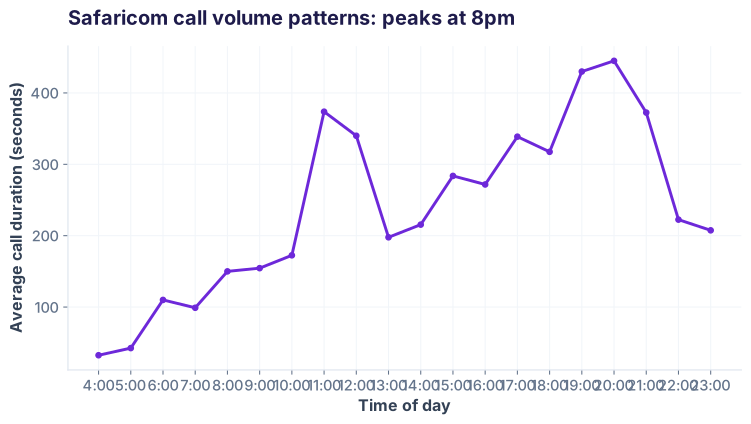
Task: Load safaricom_cdrs.csv, parse the timestamp column as datetime, and find which hour of the day has the longest average call duration. (Bonus: which region has the most 4G traffic?)
Hint 1: Use parse_dates=['timestamp'] when reading the CSV.
Hint 2: Extract hour with df['timestamp'].dt.hour
Hint 3: Group by hour: df.groupby('hour')['duration_s'].mean()
Hint 4 (bonus): Filter by network_type first: df[df['network_type'] == '4G'].groupby('region_code').size()
Common pitfalls: what breaks and how to fix it
dtype={'region_code': str}parse_dates=['timestamp']sep=';'header=1 (0-indexed)pip install openpyxlAlso used in...
Domain Spotlight
How AI systems use this
Data loading is step 1 of every machine learning pipeline. Models like scikit-learn, TensorFlow, and transformers all expect clean, typed data. A badly loaded CSV (strings instead of dates, wrong dtypes) breaks the model downstream. Large language models fine-tuned on structured data use the same patterns—load, parse, validate, feed to the model.
Interview questions: test your understanding
skiprows=5. This is common with Excel reports that have headers or metadata at the top.parse_dates=['date'] combined with format='%d/%m/%Y'. Without the format hint, pandas tries to guess and may parse as month/day/year, reversing the date.Quiz: 5 questions to test your knowledge
Ready to analyse real data?
Join the Best AI Program: The AI-Era Analyst — 5 months, fully online, with placement assistance. Week 1 is free.
Explore The AI-Era Analyst →