
Rebecca is a junior analyst at Razorpay in Mumbai. Her team analyses payment flows across India—every UPI transaction, every failed retry, every merchant dispute.
This month, she's asked to analyse 24 months of UPI transaction data: 40 million rows, each with timestamp, amount, VPA, merchant category, and status. The CSV export is 1.2 GB. Her 8 GB laptop crashes when she opens it.
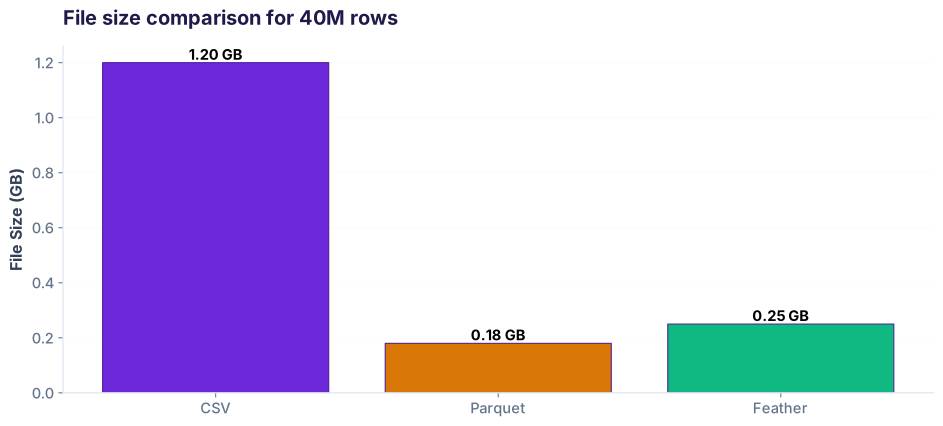
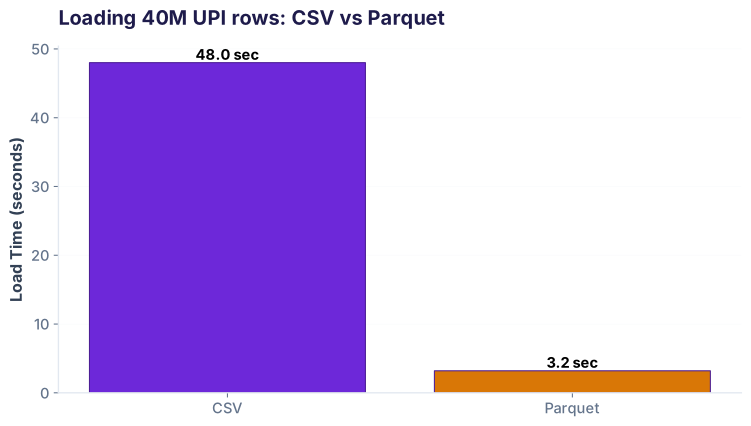
Her senior colleague says: "Stop using CSV. Switch to Parquet." Rebecca learns why in 18 minutes, and her queries now run 15x faster on 1/6 the file size.
What makes Parquet different
CSV stores data row-by-row. Parquet stores it column-by-column. This one difference changes everything.
Row format vs columnar format
| Pro | Con |
|---|---|
| ✓ Human-readable | ✗ Redundant |
| ✓ Universal | ✗ No compression |
| ✗ Slow queries |
RZP001
RZP002
RZP003
2026-03-15
2026-03-15
2026-03-15
850
2400
350
| Pro | Con |
|---|---|
| ✓ Compressible | ✗ Binary format |
| ✓ Skip columns | ✗ Bigger libraries |
| ✓ Typed dtypes |
The key insight: When you ask for just amount from 40M rows, CSV reads all 1.2 GB. Parquet reads only the amount column chunk (~180 MB for that one column). That's why columnar is faster for analytics.
Reading & writing Parquet: 3 lines you need
Step 1: Install pyarrow
Pandas uses PyArrow or FastParquet as a backend. PyArrow is faster and more stable.
Note: FastParquet also works and is lighter-weight, but PyArrow has better compression and performance. If you're on slow internet, pip install fastparquet is 50 MB smaller.
Step 2: Read Parquet (vs CSV speed)
Rebecca's first insight: same file, massive speed difference.
Step 3: Write Parquet with compression
Parquet compression trades CPU for storage. Choose based on your workflow.
In production at Razorpay: They use snappy for daily pipelines (speed matters) and gzip for long-term archive (storage matters). You choose based on your read/write ratio.
Rebecca's query: read only columns you need
Columnar storage's superpower: skip columns you don't ask for.
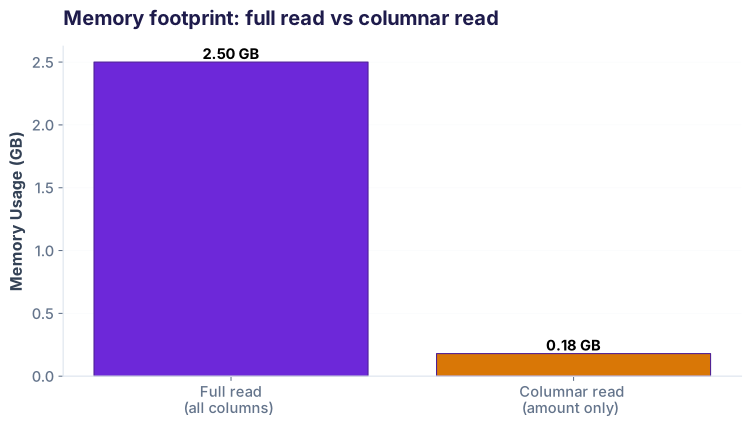
columns parameter only reads the columns you ask for. 40M rows × 24 columns → 40M rows × 3 columns. Memory drops 8x.Sample query: find high-value UPI transactions
Rebecca wants to find which merchant categories process the largest transactions. She only needs 3 columns from the 24-column file.
| txn_id | amount_inr | merchant_category |
|---|---|---|
| RZP001 | ₹850 | grocery |
| RZP002 | ₹2,400 | fuel |
| RZP003 | ₹350 | food-delivery |
| RZP004 | ₹1,200 | utilities |
| RZP005 | ₹450 | entertainment |
| ...40M rows | ||
Why this matters: At scale, you rarely need all columns. Razorpay's UPI data has 24 columns (timestamp, payer VPA, payee VPA, merchant ID, merchant category, transaction ID, status code, error code, retry count, gateway, fee, settled amount, settlement date, refund status, chargeback flag, customer tenure, device type, location, etc.). Reading all 24 just to analyse 3 wastes RAM and CPU. Parquet skips the 21 you don't need.
Partitioning: read a subset without loading everything
For truly huge datasets, partition the Parquet file by date. Then read only the months you need.
Partitioned directory structure
├── year=2026/
│ ├── month=01/part-0000.parquet
│ ├── month=02/part-0000.parquet
│ ├── month=03/part-0000.parquet
│ ├── month=04/part-0000.parquet
│ └── month=12/part-0000.parquet
├── year=2025/
│ ├── month=01/part-0000.parquet
│ └── ...
Each month's data lives in its own Parquet file. Now read Q1 2026 without loading Q2–Q4.
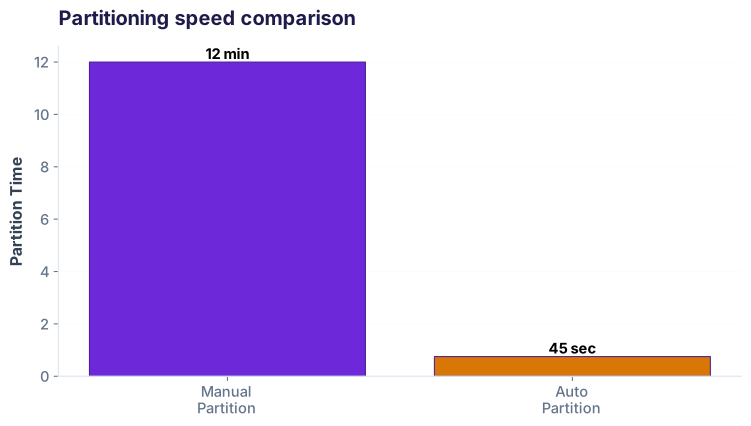
Production pattern: Razorpay writes daily Parquet files, partitioned by date. When analysts query "last 7 days," the system reads only 7 files, not 365.
When to stay on CSV (and when to switch)
| Scenario | Pick CSV | Pick Parquet |
|---|---|---|
| File size | < 100 MB | > 500 MB |
| Number of rows | < 100k rows | > 10M rows |
| Use case | One-off analysis, data sharing | Production pipelines, repeated queries |
| Team access | Non-technical stakeholders (Excel, Google Sheets) | Engineers & data teams |
| Storage | S3 occasional, cold storage | S3 production, frequent reads |
| Sharing format | Email, Slack, downloads | Data warehouse, analytical warehouse |
| Columns per query | Always read all columns | Subset of columns regularly |
| Read frequency | One time, infrequent | Many times, dashboards, reports |
Rebecca's rule of thumb: If your CSV is over 500 MB OR you're reading it more than once a week, convert it to Parquet. Spend 2 minutes converting; save 10 minutes per query.
Sample data to follow along
pd.read_csv('razorpay_sample.csv') works.Cheatsheet: Parquet essentials
| Task | Code |
|---|---|
| Install backend | pip install pyarrow |
| Read Parquet file | df = pd.read_parquet('file.parquet') |
| Read specific columns | df = pd.read_parquet('file.parquet', columns=['col1', 'col2']) |
| Write with snappy | df.to_parquet('out.parquet', compression='snappy') |
| Write with gzip | df.to_parquet('out.parquet', compression='gzip') |
| Write with brotli | df.to_parquet('out.parquet', compression='brotli') |
| Read partitioned dataset | df = pd.read_parquet('data/', filters=[('year', '==', 2026)]) |
| Inspect file metadata | import pyarrow.parquet as pq; pq.read_table('file.parquet').schema |
| Write with index | df.to_parquet('out.parquet', index=True) |
| Read without engine | df = pd.read_parquet('file.parquet', engine='pyarrow') |
Try it: Convert and query
txn_id, amount_inr, and merchant_category columns. Print the top 5 merchant categories by total transaction amount.
df.groupby('merchant_category')['amount_inr'].sum().sort_values(ascending=False).head() after reading with the columns parameter.
Interview questions
filters to skip date partitions. (3) Use columns to read only needed fields. (4) If still large, use PyArrow's `filters` at the row group level to skip chunks. Result: 100 GB file, 5 MB query time.Common pitfalls
ImportError: pyarrow not found. Fix: pip install pyarrow. Then restart your Jupyter kernel.df['amount'] = df['amount'].astype('float32').df = pd.read_parquet('file.parquet'); print(df.head()). Or use parquet-tools cat file.parquet (pip install parquet-tools).data/year=2026/month=03/, use pd.read_parquet('data/', filters=...), not pd.read_parquet('data/year=2026/month=03/part-0000.parquet'). Let pandas discover the partition structure.Fintech · E-commerce · Telecom contexts
Why AI & ML teams use Parquet
Feature engineering pipelines read Parquet. A typical ML training loop reads 50 GB of features. With CSV, that's 5 minutes per epoch. With Parquet, it's 20 seconds. columnar selection compression partitioning fast I/O
Quiz: test your knowledge
Ready to scale your analysis?
Join the Best AI Program: The AI-Era Analyst — 5 months, fully online, with placement assistance. Week 1 is free.
Explore The AI-Era Analyst →