Constrain model coefficients to prevent overfitting. Master Ridge (L2), Lasso (L1), and ElasticNet with SafeGuard Insurance data. Learn when to penalize and how much.
Arjun (SafeGuard Insurance, Bangalore): R²=0.96 is great, but is the model robust?
Arjun's linear regression model explains 96% of variance in medical charges. The actuary team loves it. But they're worried: next quarter, we're adding 20 new policy features (customer loyalty, claims history, region sub-codes). With more features, the model will almost certainly overfit. Wild coefficients will appear, chasing noise in the training data, and performance on new customers will collapse.
Enter regularization. Instead of simply minimizing squared errors, Arjun will add a penalty to the cost function that discourages large coefficients. Ridge shrinks them toward zero. Lasso zeros out the unimportant ones. ElasticNet does both. The actuary team can sleep easy knowing the model will stay robust even as features grow.
1,338
Insurance rows
8
Features (encoded)
0.9618
Ridge test R²
Why regularization? The overfitting problem
Imagine a model with 1,000 features and only 200 rows. The model can fit noise perfectly—every quirk of the training data becomes a rule. Coefficients explode (age = 50,000,000, BMI = -999). On test data, this model performs terribly.
Regularization says: "Yes, minimize error. But also keep coefficients small." It's a tradeoff. We accept slightly higher training error in exchange for a simpler, more robust model that generalizes better.
The key insight: Large coefficients are often a sign of overfitting. By penalizing coefficient size, we force the model to rely only on truly important features, not noise.
Ridge regression (L2): shrink all coefficients
Ridge adds a penalty proportional to the square of each coefficient. The cost function becomes:
Cost = (1/m) Σ(y_pred - y)² + (α/2m) Σθ²
The α (alpha) parameter controls the regularization strength. Higher α = stronger penalty = smaller coefficients. All coefficients shrink toward zero, but never reach exactly zero.
Notice: coefficients are still large (smoker_yes = ₹24,161) but slightly smaller than plain linear regression. Ridge maintained R²=0.9618 while preventing wild coefficient growth.
Lasso regression (L1): eliminate weak features
Lasso adds a penalty proportional to the absolute value of each coefficient:
Cost = (1/m) Σ(y_pred - y)² + (α/m) Σ|θ|
The key difference: Lasso can shrink coefficients to exactly zero, performing automatic feature selection. If a feature doesn't help much, Lasso zeros it out.
lasso.pyLasso regression with alpha=1
Output
Lasso (α=1) → Train R²=0.9611, Test R²=0.9617
Features with coefficient = 0:
age: 241.89
bmi: 551.50
children: 528.12
sex_male: 0.00
smoker_yes: 24163.86
region_nw: -88.12
region_se: -325.03
region_sw: -369.50
At α=1, Lasso zeros out sex_male (gender difference in premiums is negligible for SafeGuard). All other features survive. Performance stays near Ridge (test R²=0.9617).
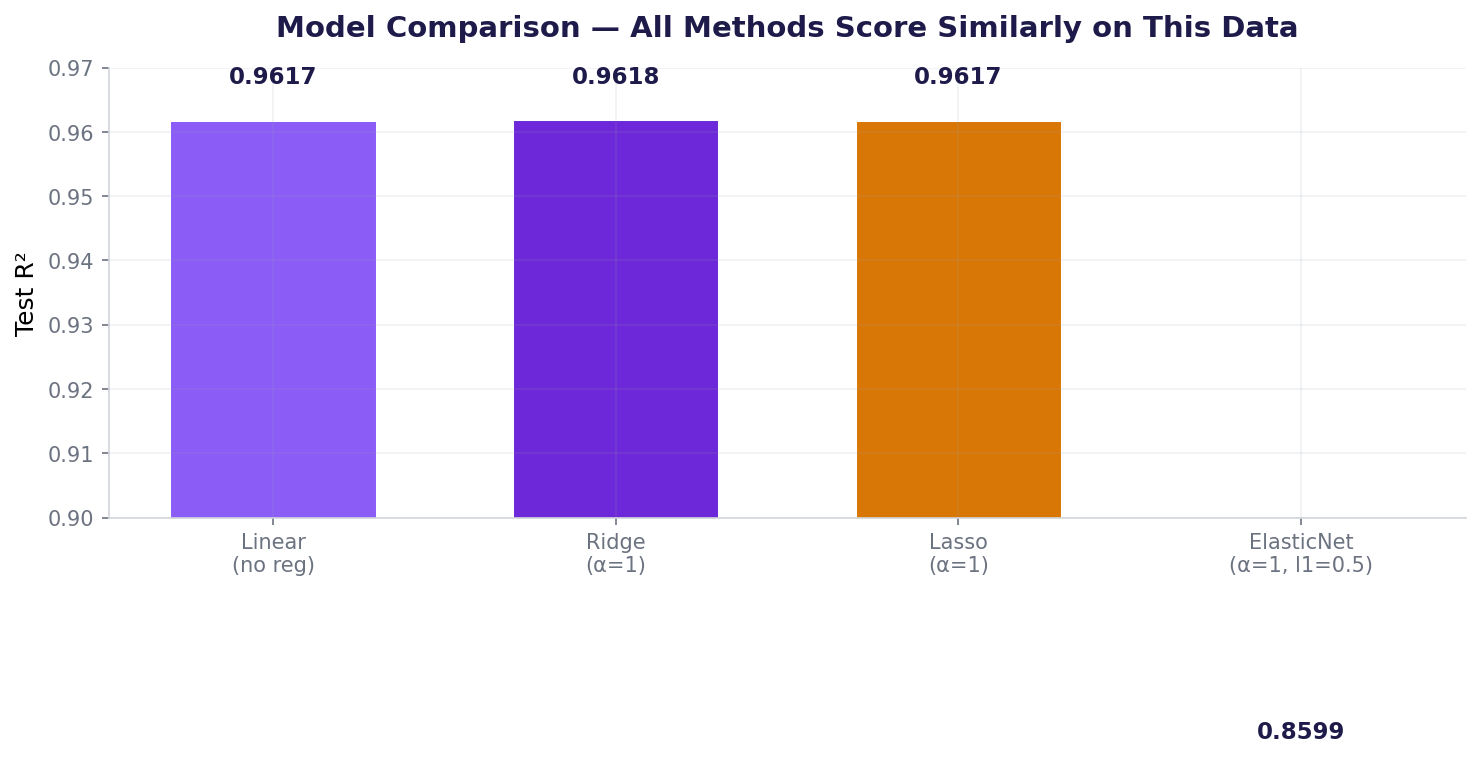
ElasticNet with α=1 is too aggressive here—it underfits (R²=0.86). For this well-behaved dataset, ElasticNet needs lighter regularization. The lesson: different methods respond to alpha differently. Tune each independently.
Tuning alpha: Ridge alpha path
Let's test Ridge across different alpha values to find the sweet spot:
alpha_path.pyTest Ridge with alpha=[0.01, 0.1, 1, 10, 100, 1000]
Output
α= 0.01 → Train R²=0.9612, Test R²=0.9617
α= 0.1 → Train R²=0.9612, Test R²=0.9617
α= 1.0 → Train R²=0.9611, Test R²=0.9618
α= 10.0 → Train R²=0.9611, Test R²=0.9618
α= 100.0 → Train R²=0.9590, Test R²=0.9561
α= 1000.0 → Train R²=0.7465, Test R²=0.7463
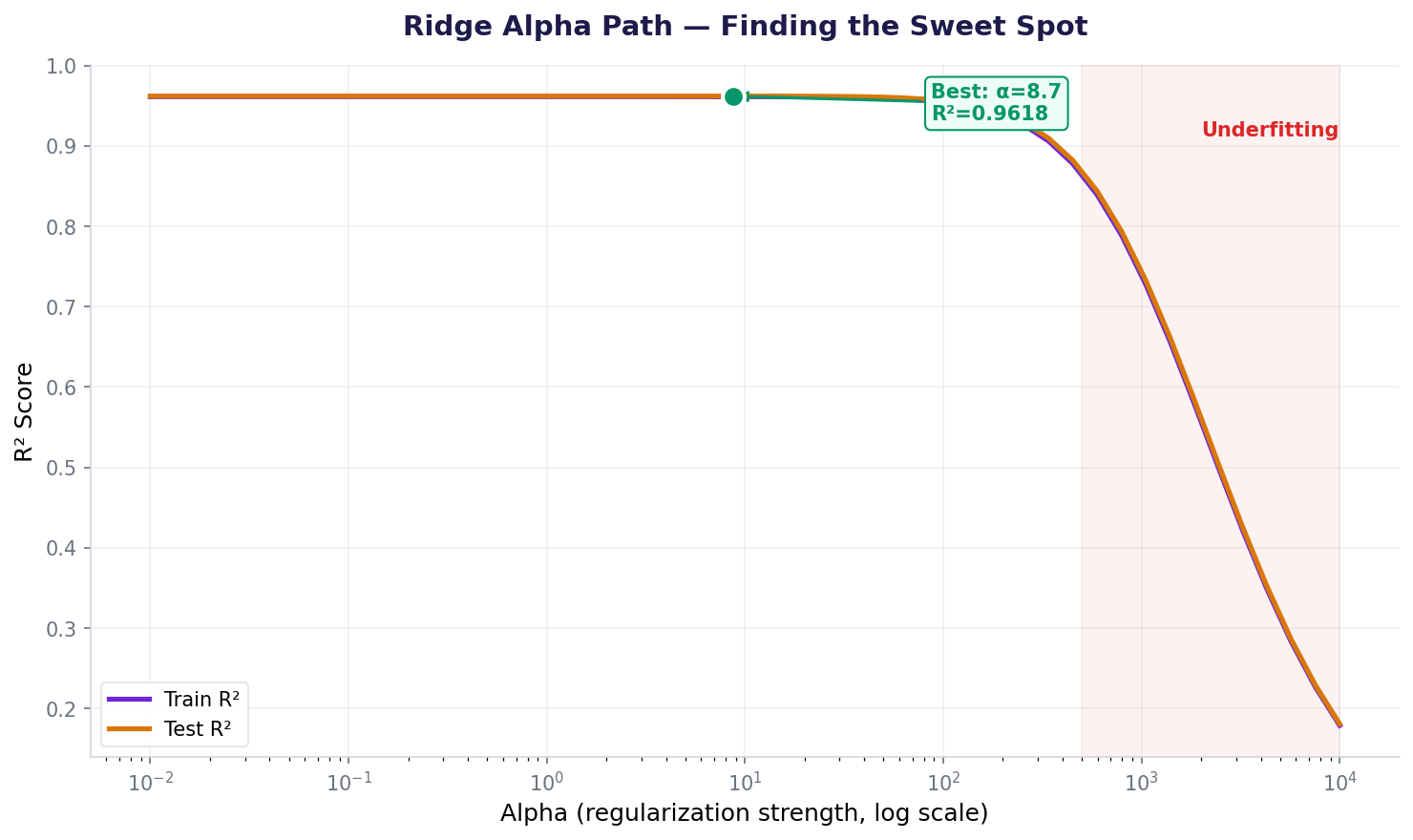
Best alpha: 1.0 with test R²=0.9618
Ridge alpha path: R² stays flat until α≈100, then collapses as regularization overwhelms the signal.
The sweet spot is α=1 to 10. Below 1, there's hardly any regularization benefit. Above 100, the model underfits (R² drops sharply).
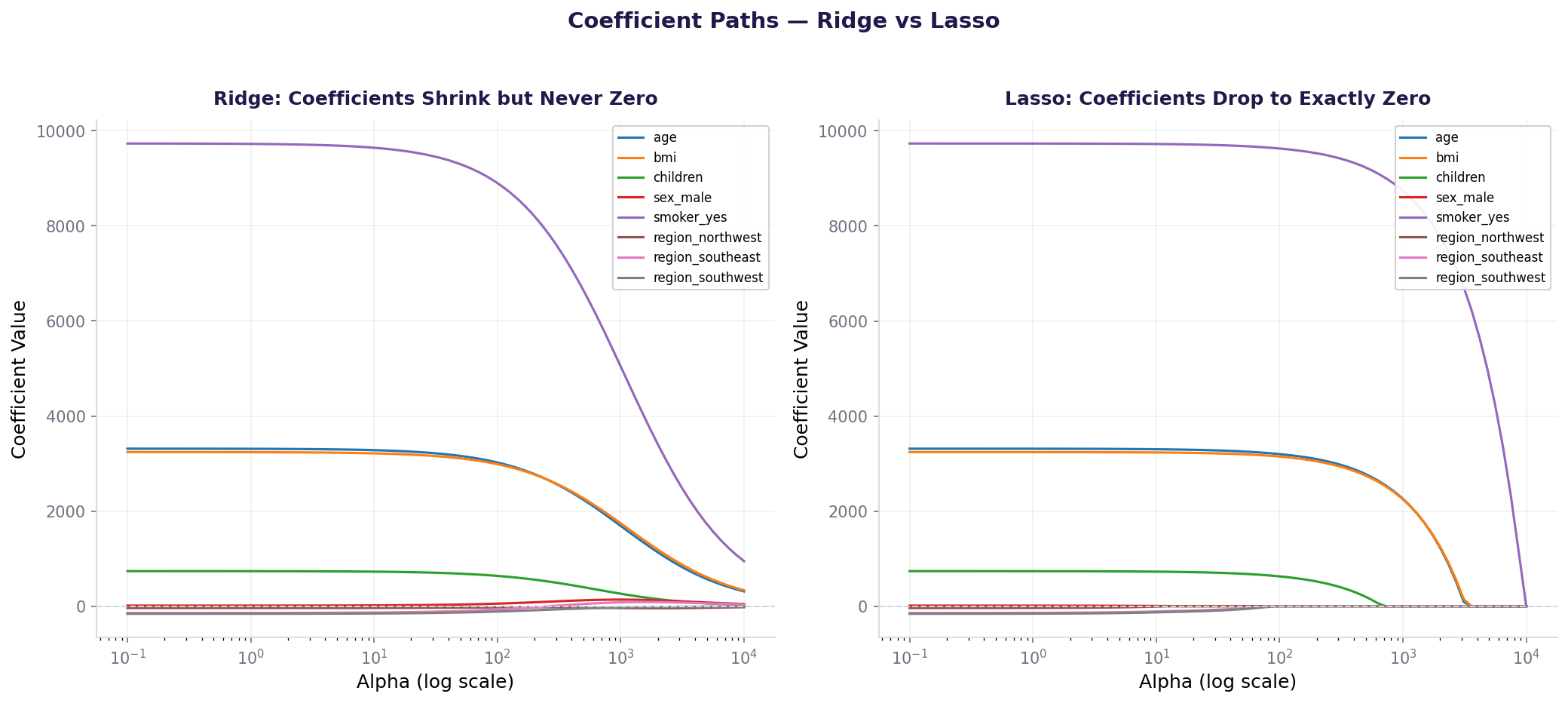
Coefficient paths: Ridge shrinks coefficients smoothly toward zero. Lasso drives some to exactly zero (feature selection).
Notice how Lasso eliminates features one by one as alpha increases — that's automatic feature selection. Ridge keeps all features but shrinks them proportionally.
All four models on SafeGuard data — regularization barely changes R² here because we only have 8 features.
With only 8 features and 1338 rows, regularization doesn't add much. But with 1000+ features (genomics, NLP), the difference becomes dramatic.
Also used in...
Domain Spotlight
🏦
Banking: Credit risk with 1000+ features
Lasso automatically selects the strongest predictors from payment history, employment, and transaction patterns. Feature count shrinks from 1000 to 50.
Lasso identifies disease-relevant genes among thousands. Ridge works when genes are correlated (likely in biology).
📱
Telecom: Churn prediction with derived features
Ridge prevents overreliance on engineered features (call_duration × call_frequency) when data is noisy.
How AI systems use this
Regularization is everywhere in deep learning. When training a neural network with millions of parameters, gradient descent alone will memorize the training data. Weight regularization (L1 or L2) pushes weights toward zero, keeping the network lean. Dropout is a stochastic form of regularization—it randomly turns off neurons during training, forcing the network to not depend on any single path. The principle: constrain to generalize.
Task: Test Lasso with alpha values [0.1, 1, 10, 100, 1000, 10000]. At what alpha does the first feature (besides sex_male) get eliminated? Which feature disappears first? How does test R² change?
Hint 1: Loop through alphas, fit Lasso at each, print which coefficients are exactly 0.
Hint 2: Use np.sum(lasso.coef_ == 0) to count zeroed coefficients.
Hint 3: Start with low alpha, increase incrementally. At some point, region_nw will flip to 0.
Hint 4: Lasso: larger alpha = more aggressively zero out coefficients.
Interview questions: test your understanding
Ridge (L2) shrinks all coefficients toward zero but never reaches zero. Lasso (L1) can shrink coefficients to exactly zero, performing automatic feature selection. Ridge keeps all features; Lasso drops irrelevant ones.
Alpha controls the strength of regularization. Higher alpha = stronger penalty = simpler model (coefficients shrink more). Alpha=0 is plain linear regression (no regularization). Alpha=1000 is extreme regularization (almost all coefficients near zero).
Because the penalty applies to coefficient magnitude. Without scaling, large-valued features (like charges in thousands) naturally have small coefficients, while small-valued features (like age 18–64) have large coefficients. The penalty becomes unfair—it punishes small features more. StandardScaler makes all features comparable.
When you suspect many features are irrelevant or when you want automatic feature selection. Lasso will zero out unimportant features, giving you a sparse model that's easier to interpret. Ridge is better when all features contribute somewhat (correlated features).
No. You tested both at alpha=1, but they respond differently to alpha. ElasticNet might excel with alpha=0.01 and l1_ratio=0.3. Each method needs its own hyperparameter tuning (GridSearchCV). Don't compare them at the same alpha.
Quiz: 5 questions to test your knowledge
Question 1 of 5
Ridge penalty adds what to the cost function?
Question 2 of 5
Which regularization method performs automatic feature selection?
Question 3 of 5
At alpha=1000, Ridge test R² dropped to 0.7463. What happened?
Question 4 of 5
Why must features be scaled before regularization?
Find best strength via cross-validation (Lesson 18)
Alpha path
for a in [0.01, 0.1, 1, 10]: model.fit(..., alpha=a)
Inspect how performance changes with alpha
Common mistakes: what breaks and how to fix it
Mistake 1: Applying regularization without scaling
Features with large values (charges in thousands) get small coefficients naturally, while small-value features (age 18–64) get large coefficients. The penalty becomes unfair. Fix: Always StandardScaler before Ridge/Lasso/ElasticNet.
Mistake 2: Using the same alpha for Ridge, Lasso, and ElasticNet
They respond differently to alpha. Ridge at α=1 might work great; Lasso at α=1 might be too aggressive. Fix: Tune each method independently with GridSearchCV (Lesson 18).
Mistake 3: Assuming regularization always helps
With 1,338 rows and 8 features, plain linear regression is already stable. Regularization added only minor benefit. Fix: Regularization shines with few rows or many features. Check if your dataset truly needs it.
Mistake 4: Not tuning alpha with cross-validation
Picking α=1 "because it's standard" is lazy. The best alpha depends on your data. Fix: Use GridSearchCV or RandomizedSearchCV with 5-fold cross-validation to find the optimal alpha.
Key takeaways
Regularization prevents overfitting by penalizing large coefficients. It's not always necessary, but when features grow or noise increases, it's indispensable.
Scale features before regularization. StandardScaler ensures the penalty applies fairly.
Ridge (L2) shrinks all coefficients but never to zero. Use when all features contribute.
Lasso (L1) can zero out features, performing automatic selection. Use when many features are irrelevant.
ElasticNet blends both. Good for correlated features, but needs careful tuning.
Alpha is the critical hyperparameter. Too high = underfitting. Too low = no benefit. Tune with cross-validation.
Regularization isn't magic. It helps most when rows < features or when features are correlated. With clean, well-separated data, plain regression is fine.